
Voice Search Local SEO: 9 Moves That Get You Picked
Someone standing in a flooded basement in Leaside does not type "plumber toronto." They say, "Hey Google, find an emergency plumber near me that's open now." The assistant answers with one business, maybe two, and offers to call. There is no page two and no list of ten blue links to scroll through.
That is the core of voice search local SEO: getting your business into that short spoken answer. The good news is that voice assistants do not use a secret voice database. They read from the same Google Business Profile, map listings, reviews and website content that drive your regular local SEO. Voice simply raises the stakes, because only the strongest local result gets said out loud.
This guide covers what changed in 2026, where each assistant pulls its local answers from, and nine practical moves to make your business the one it recommends.
What Changed for Voice Search Local SEO in 2026
Voice search used to mean an assistant reading out a snippet. In 2026, the assistants themselves are AI models that hold a conversation, compare options and explain their pick.
- Gemini replaced Google Assistant. Google began switching Android phones, tablets, watches and Android Auto from Google Assistant to Gemini on September 4, 2026. "Hey Google" now opens an AI assistant that can weigh reviews, hours and services before it answers.
- Alexa+ went generative. Amazon made Alexa+, its AI-powered assistant, generally available to US customers in February 2026.
- Siri is getting an AI upgrade. Apple's revamped Siri is reported to use Google's Gemini models for more complex requests, while still relying on Apple Maps for places.
The practical result: a spoken local query now behaves a lot like a question typed into an AI search tool. The assistant reads your profile, scans what customers say about you and checks your website before it decides. If you have already worked on Google AI Mode SEO or on getting ChatGPT to recommend your business, much of that work carries straight over to voice.
Where Gemini, Siri and Alexa Get Their Local Answers
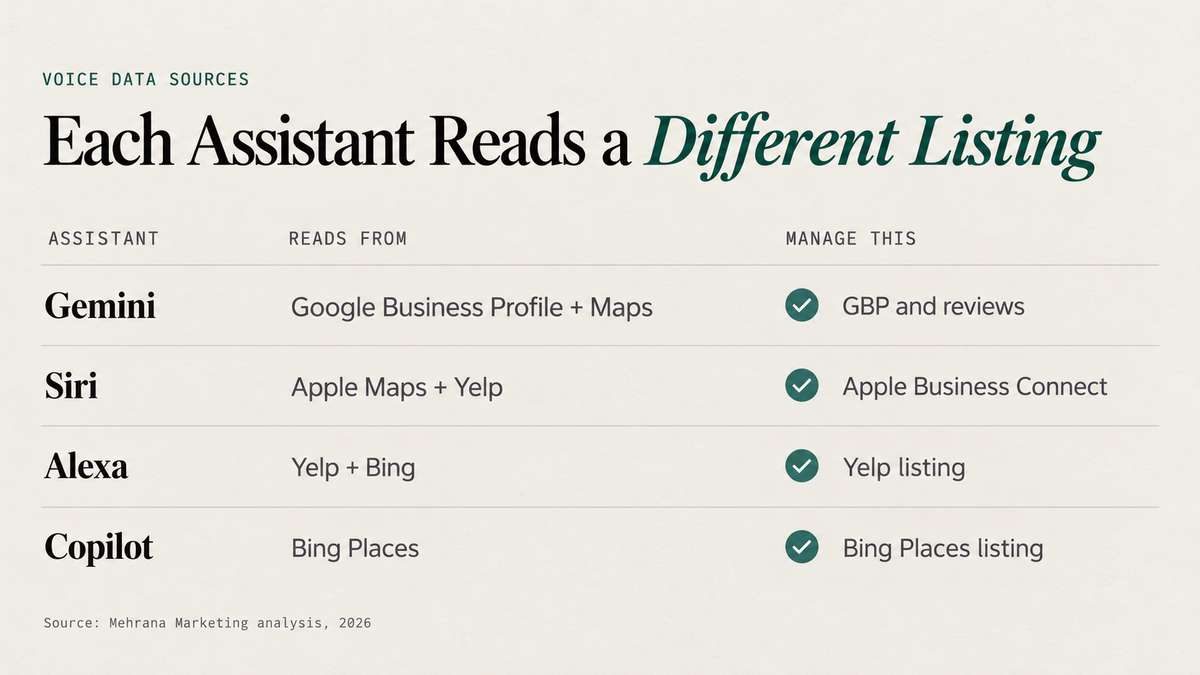
Each assistant leans on a different set of listings. This is the part most voice search guides skip, and it is the reason many businesses show up when someone asks Google but disappear when the same person asks Siri.
| Assistant | Main Local Data Source | What to Manage |
|---|---|---|
| Gemini (Android, Google app) | Google Business Profile, Google Maps, Google's web index | Google Business Profile, reviews, website content |
| Siri (iPhone, CarPlay) | Apple Maps, with reviews and data from Yelp and other partners | Apple Business Connect, Yelp listing and reviews |
| Alexa (Echo devices) | Yelp for local businesses, Bing for general web answers | Yelp listing, Bing Places |
| Copilot and Windows voice search | Bing and Bing Places | Bing Places listing |
So when a vendor offers to "submit you to Siri and Alexa," what they are really selling is listing management on these platforms. You can do it yourself, or fold it into a proper local citation building plan that keeps every listing consistent.
How Spoken Local Searches Differ From Typed Ones
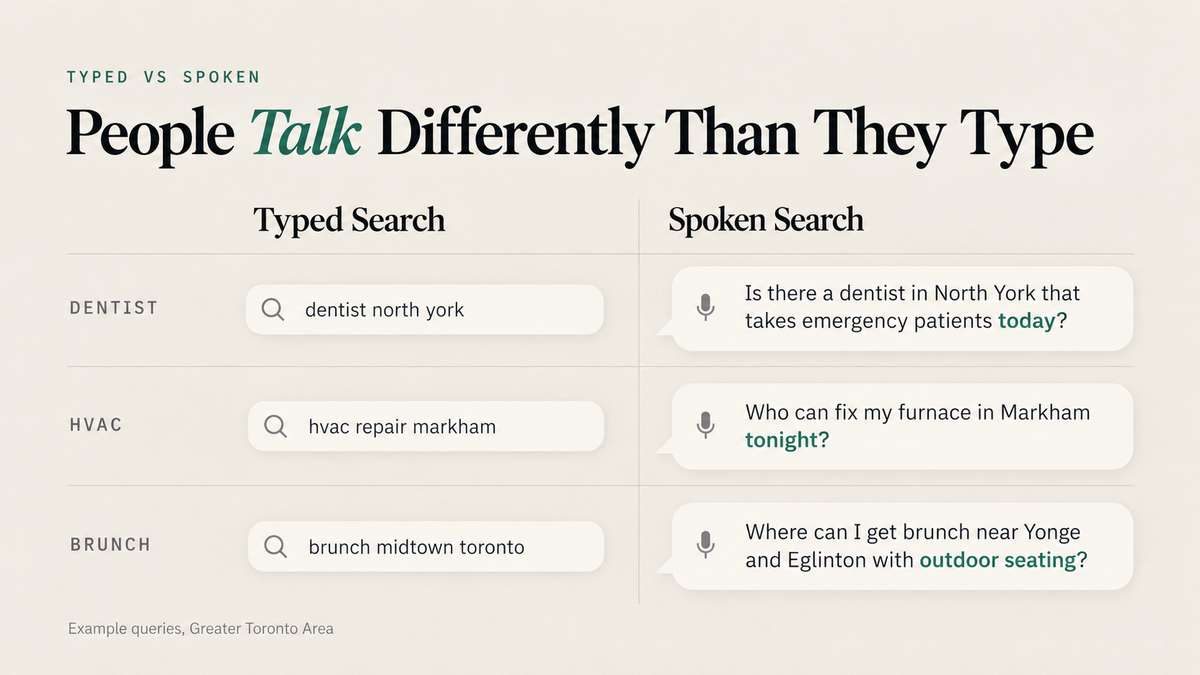
People talk to assistants the way they talk to a friend. Spoken queries are longer, phrased as full questions and usually tied to an action they want to take right now.
| Typed Search | Spoken Search |
|---|---|
| dentist north york | Is there a dentist in North York that takes emergency patients today? |
| hvac repair markham | Who can fix my furnace in Markham tonight? |
| brunch midtown toronto | Where can I get brunch near Yonge and Eglinton with outdoor seating? |
Notice the extra details: "today," "tonight," "outdoor seating," "takes emergency patients." Those qualifiers decide which business gets picked. If your profile and pages do not answer them, the assistant moves to a competitor that does.
9 Voice Search Local SEO Moves
1. Make Your Google Business Profile the Complete Answer
For anyone using Gemini, your Google Business Profile is the first thing the assistant reads. Treat it as the full answer to every question a caller might ask.
- Choose the most specific primary category, then add secondary categories for each real service.
- Keep regular hours and holiday hours accurate. "Open now" is one of the most common voice qualifiers, and wrong hours knock you out of it.
- Fill in attributes such as wheelchair access, outdoor seating, online appointments or 24/7 service.
- List every service with a short plain-language description.
- Post updates and photos regularly so the profile looks active.
A complete profile is also the foundation of Map Pack rankings, and voice answers usually come from the top of the Map Pack. If you are stuck below the top three, start with these reasons you are not ranking in the Google Map Pack, or let our team handle Google Business Profile optimization for you.
2. Claim Apple Business Connect and Fix Your Yelp Listing
Every iPhone, iPad and CarPlay system comes with Siri by default. Siri reads places from Apple Maps, and Apple Maps fills gaps with data from Yelp and other partners. If you never claimed your Apple listing, Siri may be showing old hours, a wrong phone number or nothing at all.
Claim your listing in Apple Business Connect, add your logo, photos, hours and action buttons such as "Call" or "Book," then make sure your Yelp page shows the same details. Service area businesses that do not show an address can still be found through Yelp, which makes a strong Yelp profile even more important for plumbers, electricians and other trades.
3. Keep Your Name, Address and Phone Identical Everywhere
Assistants cross-check your details across many sources before they trust them. If Google says "Suite 400," Yelp says "Unit 4" and an old directory still lists your previous phone number, you look less reliable than a competitor whose data matches everywhere.
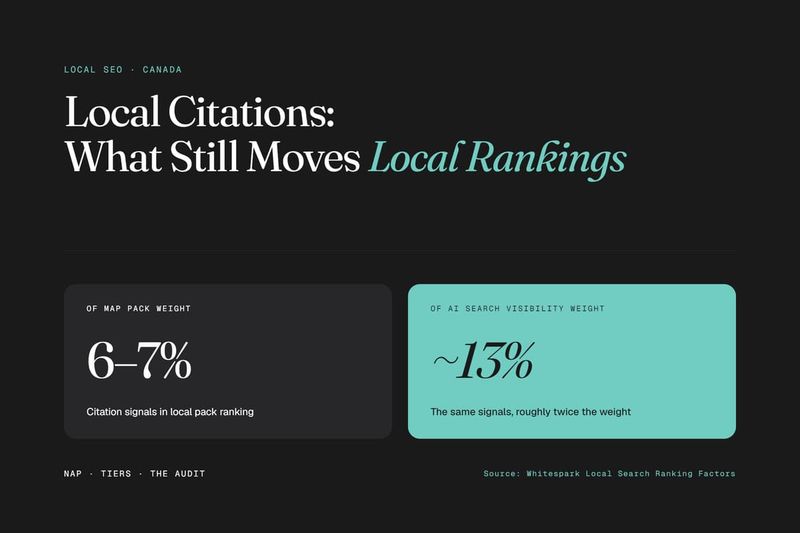
Audit your business name, address, phone number and website URL on Google, Apple, Bing, Yelp and the main Canadian directories, then fix every mismatch. Our guide to local citations in local rankings explains which directories carry the most weight and how to clean up duplicates.
Not sure whether Siri, Alexa and Gemini see the same details for your business?
4. Build Service Pages Around Spoken Questions
When an assistant needs more than profile data, it reads your website. Pages written only around short typed keywords give it very little to work with.
- Collect real questions from customer calls, emails, Google's "People Also Ask" box and tools such as AnswerThePublic or AlsoAsked.
- Add the local and urgency details people say out loud: neighbourhood names, "same day," "weekend," "near the subway."
- Give each core service its own page, and each important area its own location page, instead of one generic "Services" page.
- Write in the words customers use. "Furnace stopped working" beats "heating system malfunction."
5. Write Answers That Sound Right When Read Aloud
An assistant needs a short, clear passage it can read back. Backlinko's study of 10,000 Google Home results found the average voice answer was only 29 words long. Answer each question in the first sentence or two, then add detail underneath.
A question heading followed by a direct answer works well: "Do you offer emergency furnace repair in Markham? Yes, our technicians handle no-heat calls across Markham and Richmond Hill seven days a week, usually within a few hours." This answer-first structure is the same approach behind answer engine optimization, so it helps you in AI search tools as well as voice.
6. Add LocalBusiness and FAQ Schema
Structured data tells machines exactly what your business is, where it operates, when it is open and what it offers. Add LocalBusiness schema, or a more specific type such as Dentist or Plumber, with your address, phone number, hours, service area and geo coordinates. Mark up FAQ sections too. Google rarely shows FAQ rich results for most sites now, but the markup still helps assistants and AI models read your answers cleanly. Our guide to schema markup for AI search walks through the types worth adding.
7. Earn Reviews That Mention Your Services and Neighbourhoods
When an AI assistant explains its pick, it often summarizes what reviewers say. A review that reads "fixed our furnace in Thornhill the same night" gives it far more to work with than "great service."
- Ask for reviews right after a job, with a direct link.
- Invite customers to mention what you did for them and where, without scripting their words.
- Reply to every review, including the negative ones.
- Do not ignore Yelp. Siri and Alexa both lean on Yelp ratings and review counts.
8. Make Your Mobile Page Fast and Call-Ready
Most voice searches happen on phones, and the next step is usually a tap to call or get directions. If the page loads slowly or the phone number is buried, the customer goes back and picks someone else. Put a tap-to-call button at the top of every service page, show your hours near it, and keep load times low. A fast-loading website also removes one of the reasons assistants skip a page as a source.
9. Answer Every Call Voice Search Sends You
Voice search sends people who want to act now, and most of them call. All the work above is wasted if that call rings out or goes to voicemail after 5 p.m. An AI receptionist can pick up every call, answer common questions and book the appointment while you are on a job, so the lead you earned from voice search does not end up with the next business on the list.
Voice search brings callers who are ready to book. Make sure none of them reach voicemail.
Listing Checklist for Siri, Alexa and Bing
Google gets most of the attention, but a business that is only on Google is invisible to a large share of voice searches. Work through this list once, then review it every quarter.
- Apple: claim and verify your place card in Apple Business Connect, add photos, hours and action links, and check how Siri reads your business on an iPhone.
- Bing: claim your listing in Bing Places for Business. You can import your details from Google Business Profile to save time.
- Yelp: claim your free business page, match your details to Google and Apple, and keep reviews coming in.
- Canadian directories: confirm your listing on the main national and city directories in your industry with the exact same details.
How to Track Voice Search Results Without Voice Data
No tool reports "voice traffic" directly. Google Search Console does not separate spoken queries, and assistants do not share their logs. You track the signals that voice search produces instead.
- Calls and direction requests in your Google Business Profile performance report. These usually rise first when voice visibility improves.
- Question queries in Google Search Console. Filter for queries containing "who," "where," "how," "near me" or "open."
- Monthly spoken tests. Ask Gemini, Siri and Alexa your top five questions from your service area and note who gets recommended.
- Map Pack positions for your main keywords across your service area, since voice answers usually come from the top results.
Our clients see calls, Map Pack positions and review growth together in one live client dashboard, which makes it easier to connect listing fixes with real enquiries.
Common Voice Search Local SEO Mistakes
- Optimizing Google only and leaving Apple, Bing and Yelp unclaimed.
- Letting holiday hours go out of date, which removes you from "open now" answers.
- Paying for a "voice search submission" service that only creates more directory listings.
- Writing pages full of long introductions before the actual answer.
- Earning voice search calls but not answering them.
FAQ
Frequently asked questions
What Is Voice Search Local SEO?
Voice search local SEO is the work of getting your business recommended when people ask a voice assistant such as Gemini, Siri or Alexa for a nearby product or service. It relies on the same signals as regular local SEO, including your Google Business Profile, map listings, reviews and website content.
Do Siri and Alexa Use Google Business Profile?
Not directly. Siri reads local places from Apple Maps, which also uses Yelp data, and Alexa relies heavily on Yelp for local businesses. To show up on all three assistants, you need your Google, Apple and Yelp listings claimed and consistent.
How Long Should a Voice Search Answer Be?
Short. Backlinko found the average voice answer was about 29 words. Put a direct one or two sentence answer right under each question, then add detail below it.
Can I Track Voice Search Traffic in Google Analytics?
No. Voice queries are not separated in Google Analytics or Search Console. Track calls and direction requests in your Google Business Profile, question queries in Search Console and regular spoken tests on each assistant.
Get Your Business Into the Spoken Answer
Voice assistants give one or two answers, so being "on page one" is no longer enough. The businesses that get picked have complete profiles on every platform, matching details everywhere, pages that answer real questions in plain words and strong reviews. Get those right and you show up whether a customer asks Gemini, Siri or Alexa.
Want to know which assistant recommends you and which one sends customers to a competitor?

Discussion