
Is My Business Visible in ChatGPT? A 5-Minute Local Check
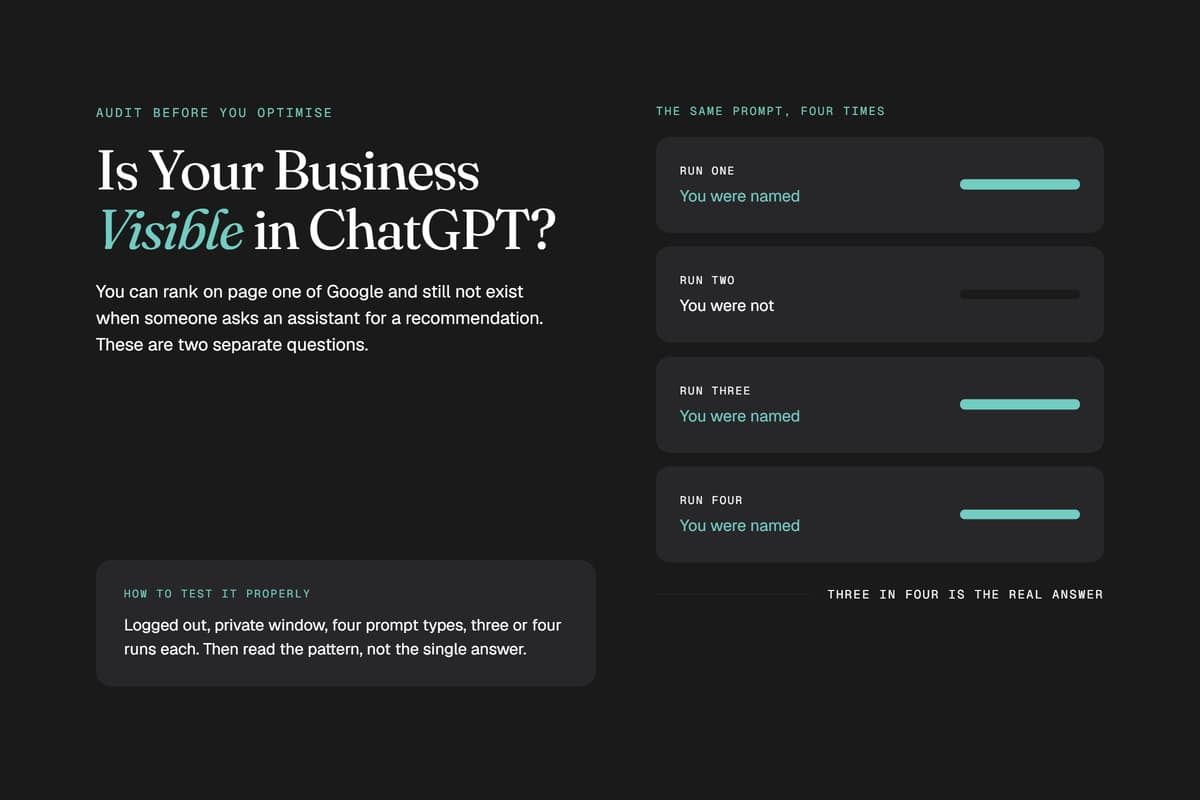
More of your customers now skip Google and ask ChatGPT a direct question: "Who is the best [service] near me?" If your business is not visible in ChatGPT when that question gets asked, a competitor gets the lead, and nothing in your analytics tells you it happened. You can sit on page one of Google and still be missing from the answer, because AI assistants lean on a different mix of signals, the same ones AI search SEO is built to earn.
Quick answer: Open ChatGPT in a private, logged-out window and ask the questions your customers ask, such as "best [service] in [your city]," three times each. If your name appears with the right details, you are visible for that question. If it does not, the usual causes are inconsistent listings, a thin Google Business Profile, few third-party mentions, or pages AI crawlers cannot read.
Already know you are missing? Go straight to our guide on how to get ChatGPT to recommend your business.
Want to know what ChatGPT says about you without running the prompts yourself?
What "Visible in ChatGPT" Means for a Local Business
There is no business directory inside ChatGPT, no form to submit and no listing to claim. Being visible means one thing: when someone asks about a service like yours in your area, your name shows up in the answer.
Visibility comes in three levels:
- Mentioned: ChatGPT names you somewhere in the answer, often in passing or low in a list.
- Recommended: ChatGPT names you as a top choice, with accurate hours, location and services.
- Cited: ChatGPT links to your website as a source. This happens when it searches the web live and finds your page useful enough to rely on.
Which questions you test matters just as much. A branded question ("tell me about [your business]") only tells you whether ChatGPT knows you exist. A discovery question ("best [service] in [city]") tells you whether a new customer will ever hear your name. Discovery is where the revenue is, and it is far harder to win. SOCi's 2026 Local Visibility Index, which looked at roughly 350,000 business locations, found ChatGPT recommended only 1.2% of them, while 35.9% appeared in Google's local 3-pack.
Strong local SEO and Map Pack rankings help, but they do not carry over automatically. The factors that decide AI rankings are covered in our guide on how to rank on ChatGPT; this page is about measuring where you stand today.
How to Check If Your Business Shows Up in ChatGPT
You do not need a paid tool for the first test. You need about 20 minutes and a consistent method, because most owners do this wrong: they type their own business name, get a friendly answer, and assume they are covered.
- Open a clean session. Use a private window and stay logged out. A logged-in account carries memory of your past chats, which tilts the answer toward what you want to see.
- Make sure search is on. When ChatGPT searches the web, it shows sources you can inspect. Without search, it answers from training data alone.
- Write 10 to 15 customer-style prompts. Use the four prompt types below, swapping in your real service, city and neighbourhoods.
- Run each prompt three times. Answers are probabilistic, so the same question can return different businesses a few minutes apart. Your real number is how often you appear, not whether you appeared once.
- Open every cited source. The links show which directories, review sites and round-up articles ChatGPT trusts in your category. Those are the places you need to be.
- Repeat in Perplexity, Gemini and Google AI Mode. Each engine names different businesses.
- Log the date and results. Without a record, next month's test has nothing to compare against.
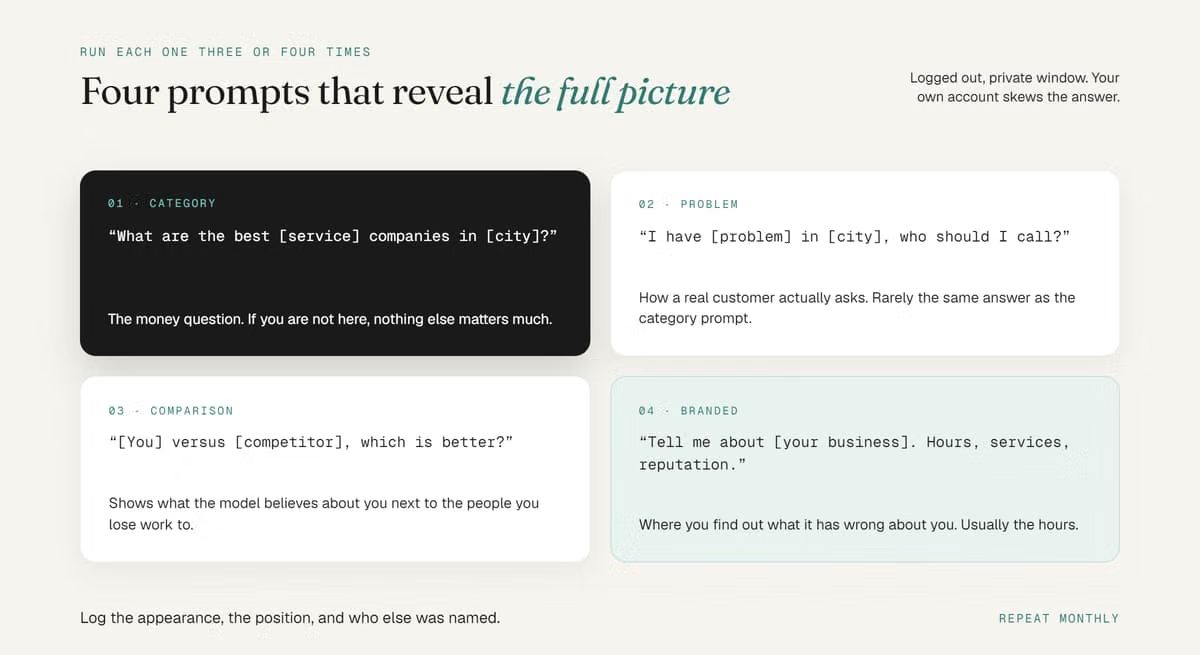
The Four Prompt Types That Reveal the Full Picture
- Category prompt: "What are the best [service] companies in [city]?"
- Problem prompt: "I have [the exact problem you solve] in [city], who should I call?"
- Comparison prompt: "Is [your business] a good choice for [service]?" or "[Your business] vs [competitor], which is better?"
- Branded prompt: "What do you know about [your business]? What are their hours, services and reputation?"
Category and problem prompts carry the most revenue weight because they reach buyers before they have chosen anyone. Comparison prompts show whether your reviews and proof hold up next to a competitor. Branded prompts reveal what the model believes about you, including wrong facts you need to correct at the source.
Build a Simple ChatGPT Visibility Log
A spreadsheet is enough. For every run, record:
- Date, AI engine and the exact prompt
- Whether you appeared (yes or no)
- Your position in the answer (first, middle of a list, last)
- Accuracy of the description (correct, vague or wrong)
- Competitors named instead of you
- Sources cited
If you appear in 6 of 15 runs for "emergency plumber North York," your visibility rate for that prompt is 40%. That is the number to move.
Reading Your Results: A ChatGPT Visibility Scorecard
| What You Saw | What It Means | First Move |
|---|---|---|
| Recommended, details accurate | Strong visibility for that prompt | Protect it with steady reviews and test more prompts and neighbourhoods |
| Mentioned, not recommended | ChatGPT knows you but trusts others more | Build reviews and third-party proof |
| Named with wrong details | Conflicting business data across the web | Correct your name, address and phone everywhere |
| Missing, competitors named | Competitors are easier for AI to verify | Get listed on the sources ChatGPT cited |
| No local business named | Your category is still open | Move first, before a competitor fills the gap |
If wrong details are the problem, start with local citation building so your name, address and phone number match on every directory. If competitors win on reputation, a fully built Google Business Profile and a steady flow of new Google reviews usually do more than anything you change on your website.
How ChatGPT Decides Which Local Businesses to Name
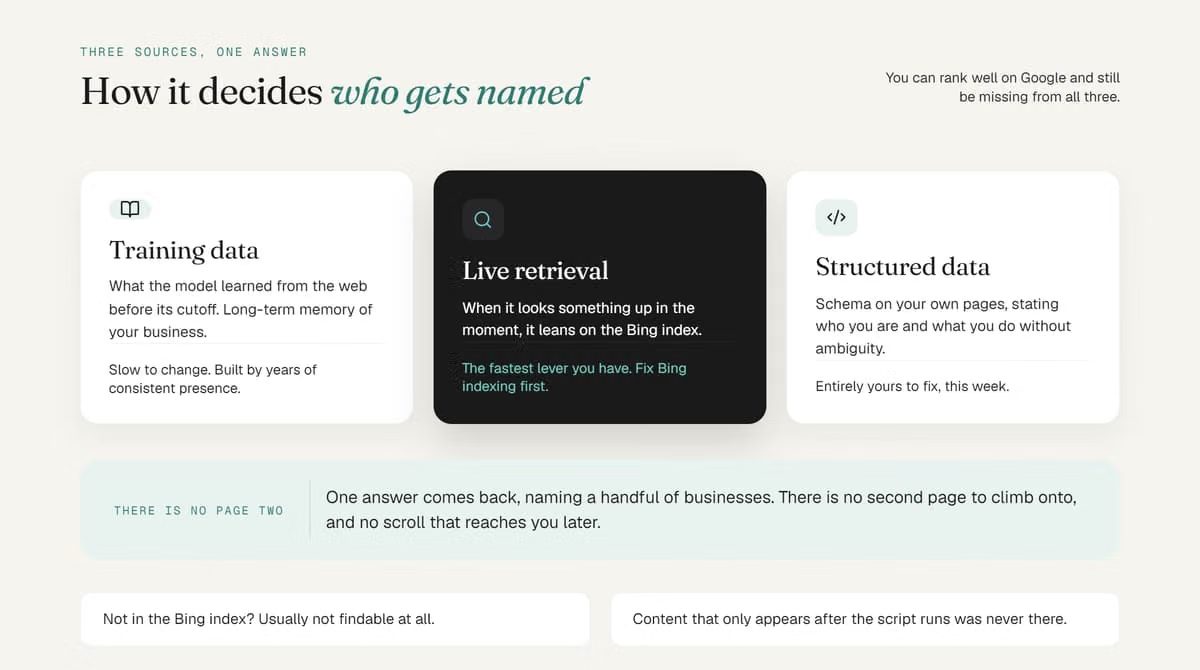
ChatGPT does not list ten links. It writes one answer that names two to four businesses, and there is no page two. It builds that answer from three layers:
- Training data: what the model learned from the public web before its cutoff, including directories, review platforms, news and Wikipedia. Businesses mentioned consistently across many sources are simply known to it.
- Live search: when ChatGPT searches, it fetches current pages through its own crawler, OAI-SearchBot, along with results from search partners.
- Your own site and profiles: clear service pages, accurate business details and a complete Google Business Profile give the model facts it can repeat with confidence.
Reputation sits on top of all three. In SOCi's data, the locations ChatGPT recommended averaged 4.3 stars, and business details shown by ChatGPT and Perplexity were only about 68% accurate. That is why checking what ChatGPT says about you matters as much as checking whether it names you.
Why Your Business Is Missing From ChatGPT Answers
If your log came back mostly "missing," one or more of these is usually the cause:
- Inconsistent NAP. Different names, addresses or phone numbers across your site, Google Business Profile and directories make AI unsure which version is true, so it leans on a competitor it can verify.
- A thin profile and few recent reviews. Reviews weigh heavily in local recommendations, and short, generic reviews give the model little to work with. Reviews that name the actual service help most.
- No third-party mentions. If the directories, round-ups and local press that ChatGPT cited never mention you, the model has no outside proof that you exist.
- Vague service pages. Pages that never state plainly what you do, where and for whom leave the AI guessing.
- AI crawlers blocked. If robots.txt blocks OAI-SearchBot, your pages cannot be read for ChatGPT search.
- Content hidden behind JavaScript. AI crawlers often do not run JavaScript. If your text only appears after the page loads in a browser, the crawler sees an empty shell.
A note on schema: Organization and LocalBusiness markup helps machines read your facts cleanly, and it is worth having. But controlled tests in 2026 found that adding schema on its own produced no meaningful lift in AI citations. It supports the fixes above; it does not replace them.
Fixing the Gaps: Local SEO and AI Search SEO Priorities
Match the fix to what your log showed. For most local businesses, this order works:
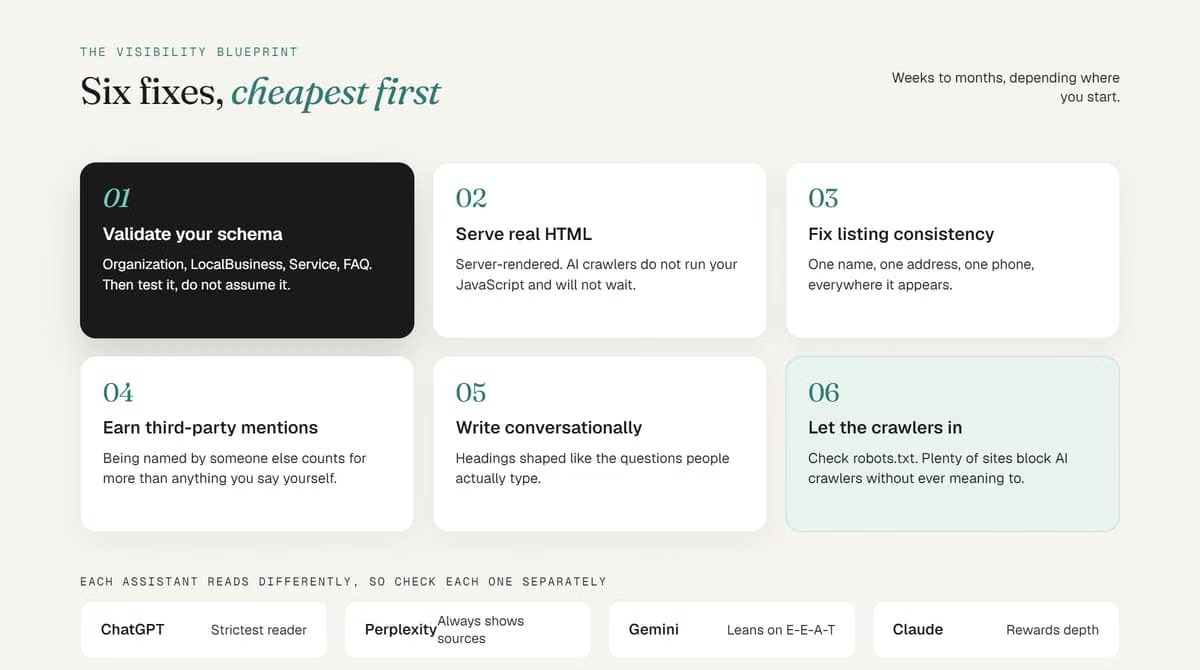
- Open the door to AI crawlers. Allow OAI-SearchBot, GPTBot, PerplexityBot and Google-Extended in robots.txt. Skip llms.txt for a local service site; our llms.txt breakdown explains why it rarely helps.
- Serve readable HTML. The words a crawler needs should be in the first server response. A fast, custom-built website makes that the default.
- Lock down your business data. Make your name, address, phone, hours and categories identical on your site, Google Business Profile and every directory.
- Earn specific reviews. Ask happy customers to mention the service and neighbourhood in their own words.
- Get listed where ChatGPT looks. Use the cited sources from your test as your target list.
- Write the way buyers ask. Answer real customer questions in plain language on your service pages, and add accurate Organization, LocalBusiness and FAQ schema to support them.
Listings, reviews and your Google Business Profile drive local AI visibility. We handle all three in one local program.
ChatGPT vs Perplexity vs Gemini: Visibility Isn't One Score
Being recommended on one engine does not mean you are recommended on the others. In the SOCi 2026 Local Visibility Index, Gemini recommended 11% of locations and Perplexity 7.4%, against 1.2% for ChatGPT. Test every prompt on every platform:
- ChatGPT is the most selective. It mixes training data with live search, and it needs your content in the initial HTML.
- Perplexity always shows its sources, so a mention there is easy to trace back to the page that earned it.
- Gemini draws on Google's own data, including Maps, and it powers the AI Overview at the top of Google results.
For how these engines differ in what they extract, cite and recommend, see our comparison of GEO vs AEO vs LLM SEO.
How Often to Re-Test and How to Track ChatGPT Traffic
Treat each check as a snapshot. Re-run the same prompts every month, plus after any major change to your website, address or services.
You can also measure the visits ChatGPT sends you. According to OpenAI's publisher FAQ, ChatGPT adds utm_source=chatgpt.com to the links it sends, so you can filter those sessions in Google Analytics and see which pages AI is citing.
Where Toronto Businesses Start With AI Search Visibility
AI search is still an open field, and few businesses in the GTA have optimized for it. The businesses named in AI answers next year are the ones starting the work now.
If you want to know exactly where you stand, a free AI visibility audit runs your business and your competitors through the major AI engines and shows the specific gaps to close. You can also see how this played out for real businesses in our case studies.
See what ChatGPT, Perplexity and Gemini say about your business, and what your competitors have that you don't.
FAQ
Frequently asked questions
How Do I Check If My Business Appears in ChatGPT?
Open ChatGPT in a private, logged-out window with search turned on, and ask the questions your customers ask, such as "best [service] in [city]" or "who should I call for [problem]." Run each prompt three times, since answers vary, and note whether you are named, where you appear, and whether the details are correct.
Can I Submit or Pay to Appear in ChatGPT?
No. There is no submission form or paid placement for business recommendations in ChatGPT. Any public website can appear in ChatGPT search, and recommendations are built from public signals: accurate listings, reviews, third-party mentions and pages AI crawlers can read.
Why Does My Business Rank on Google but Not Show Up in ChatGPT?
Google rankings and AI recommendations are separate systems. ChatGPT weighs consistency across the web, reviews and third-party mentions differently, and it recommends far fewer local businesses than appear in Google's local 3-pack. You need to check and work on both.
Why Does ChatGPT Give Different Answers to the Same Question?
Its answers are generated fresh each time rather than pulled from a fixed ranking. Wording, location, whether search is on, and model updates all change the result, which is why you should measure how often you appear across several runs.
Discussion