
Email Marketing for Small Business: A Canadian Guide
Most small businesses already have the start of an email list. It sits in the booking system, the POS, the quote spreadsheet and the inbox. What they usually lack is a plan for turning those contacts into repeat sales. Email marketing for small business is that plan: a set of opt-in emails, some sent by hand and most sent automatically, that keep past customers buying and move new leads toward their first purchase.
This guide is written for owners in Canada, which means it covers something most American guides skip: Canada's Anti-Spam Legislation (CASL). You will get a 7-step setup, 8 campaign ideas you can launch this month, the numbers worth watching and a clear point at which handing the work to email marketing services makes more sense than doing it yourself.
What Small Business Email Marketing Covers in 2026
Small business email marketing is any commercial email you send to people who agreed to hear from you. In practice it falls into three groups:
- Automated sequences. Emails triggered by an action, such as a welcome series after sign-up, a follow-up after a quote request or a review request after a purchase. You build them once and they run every day.
- Campaigns. One-time sends to your list or a segment of it, such as a seasonal offer, an event invitation or a new service announcement.
- Newsletters. Regular updates that mix useful content with a light offer. This is where email and content marketing meet: one blog post can become the core of a newsletter.
Transactional emails (receipts, booking confirmations, password resets) are a separate category. They are not marketing, but they are often the first place a customer can be invited to subscribe.
Benefits of Email Marketing for Small Businesses
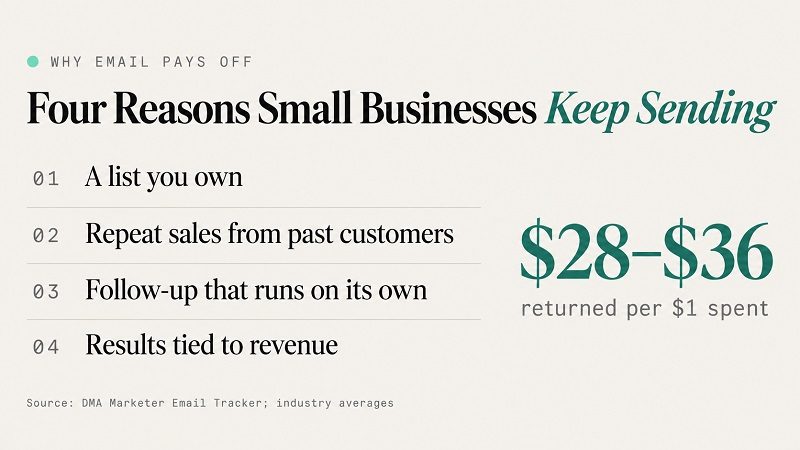
Industry studies regularly put the return on email at somewhere between $28 and $36 for every dollar spent. The averages matter less than the reasons behind them, because those reasons tell you how to get the same result.
1. A Customer List You Own Outright
Social platforms decide how many of your followers see a post. An email list belongs to you. If an algorithm changes or an ad account gets paused, you can still reach every subscriber the same day.
2. Repeat Sales From People Who Already Bought
A past customer already trusts you. A short email at the right moment, such as a reminder that a service is due or a heads-up about new stock, often brings a second sale at almost no acquisition cost.
3. Lead Nurturing That Runs Without Your Time
Most website visitors are not ready to buy on their first visit. A sequence of helpful emails keeps your business in front of them until they are. This is the core of lead nurturing: the follow-up happens automatically, so good leads stop going cold while you are busy serving customers.
4. Results You Can Tie Back to Revenue
Every email shows who opened, who clicked and, with basic tracking, who bought or booked. Few marketing channels give a small business that level of clarity.
Not sure whether your current list is ready to send? We will review your sign-up forms, sender setup and first emails, and tell you what to fix first.
How to Build a Small Business Email Marketing Strategy in 7 Steps
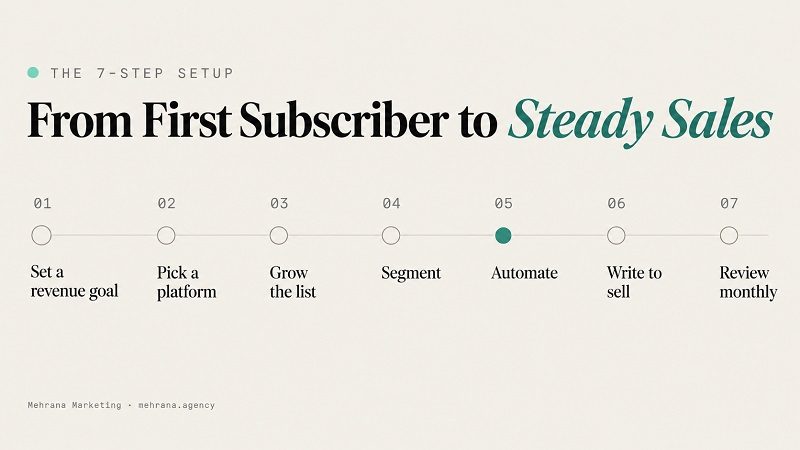
The steps below work for a café, a clinic, a contractor or an online shop. The details change; the order does not.
Step 1: Set One Revenue Goal for Your Email Program
Start with a single goal tied to money, not a vague aim like "stay in touch." Good examples:
- Turn 10% more quote requests into booked jobs within 90 days.
- Get 25% of first-time customers to buy again within six months.
- Fill every seat for a monthly workshop from the list alone.
The goal decides which emails you build first. A contractor chasing quotes needs a follow-up sequence before a newsletter. A shop chasing repeat orders needs a post-purchase flow.
Step 2: Choose an Email Marketing Platform That Fits Your Business Model
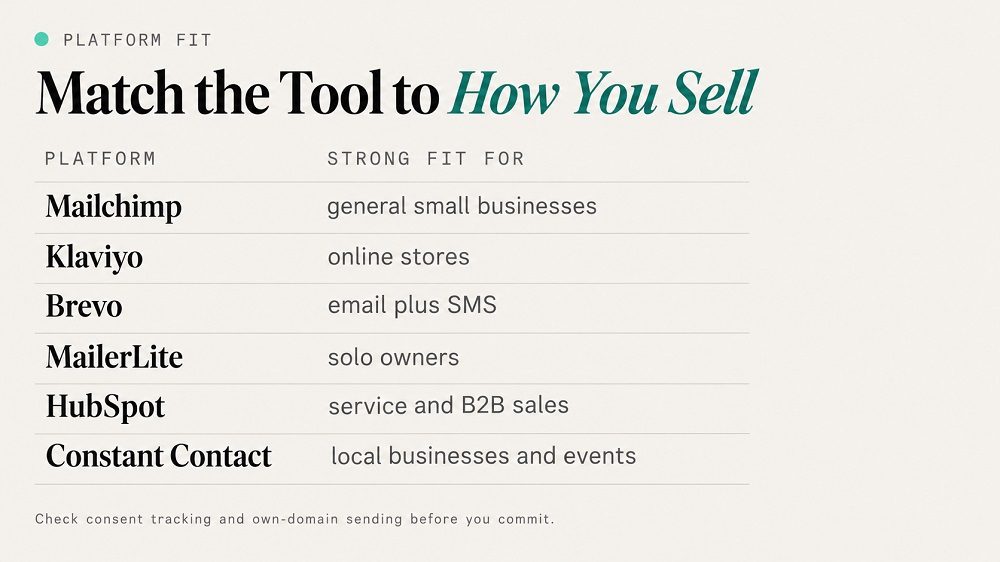
The best email marketing for small business is the platform your team will actually use. Look for a simple editor, signup forms, automation, segmentation, consent tracking and reporting. Then match the tool to how you sell:
| Platform | Strong Fit For | Worth Knowing |
|---|---|---|
| Mailchimp | General small businesses starting out | Familiar editor and wide range of integrations |
| Klaviyo | Online stores on Shopify or WooCommerce | Deep purchase data for product-based automation |
| Brevo | Businesses that want email and SMS together | Handles marketing and transactional email in one place |
| MailerLite | Solo owners and small teams | Clean interface with landing pages and forms included |
| HubSpot | Service and B2B businesses with a sales process | Email sits inside a full CRM with deal tracking |
| Constant Contact | Local businesses and event hosts | Built-in event registration and simple campaign tools |
Before you commit, check two things: that the platform records when and how each contact gave consent (you will need this for CASL), and that you can send from your own domain rather than a free Gmail or Outlook address.
Step 3: Grow Your List With a Lead Magnet and Landing Page
"Sign up for our newsletter" rarely works. People subscribe when they get something useful in return, such as a checklist, a price guide, a first-visit discount or a seasonal maintenance reminder. Give that offer its own landing page with one form and one call to action, then promote it from your website, Google Business Profile, social media and in-store signage.
Places small businesses often overlook:
- A consent checkbox at checkout or in the booking form.
- A QR code at the counter, on receipts or on invoices.
- The confirmation page after someone requests a quote.
- Your email signature and every staff member's signature.
Keep the form short. A first name and an email address is enough to start.
Step 4: Segment Subscribers by Where They Are in Your Marketing Funnel
Sending the same email to everyone is the fastest way to lose subscribers. Even three basic segments make a difference: new leads who have never bought, active customers, and lapsed customers who have not bought in a long time. Each group sits at a different point in your marketing funnel and needs a different message. Once those three are working, add segments by service, product interest or location.
Step 5: Automate Welcome, Follow-Up and Win-Back Sequences
Automation is where small business email marketing pays off, because it does the follow-up you never have time for. Start with three sequences:
- Welcome sequence: 3 to 5 emails over two weeks that deliver the lead magnet, introduce your business and make one clear offer.
- Follow-up sequence: emails after a quote, consultation or abandoned cart that answer common objections and invite the next step.
- Win-back sequence: a short series for customers who have gone quiet, with a reason to come back.
If your leads arrive through several tools (website forms, phone calls, booking software), connecting them so every new contact lands in the right sequence is a job for AI automation rather than manual copying and pasting.
Step 6: Write Sales Emails That Earn the Click
Knowing how to use email marketing for sales comes down to a few habits:
- Subject line: short and specific. "Your furnace check is due" beats "October Newsletter."
- Preview text: finish the thought the subject line started.
- One message per email: one offer, one reason, one button.
- Mobile first: short paragraphs, a large button and images that load fast on data.
- The 80/20 balance: make most emails helpful and only some of them a direct pitch, so subscribers keep opening.
Step 7: Review Results Monthly and Adjust
Set a monthly check-in. Look at which emails produced clicks and sales, which segments responded, and where people unsubscribed. Change one thing at a time, such as a subject line style or send day, so you know what caused the result.
8 Email Marketing Ideas for Small Business Owners
If you are not sure what to send, these 8 campaigns cover most small business needs. Start with the first three, since they bring in revenue fastest.
1. Welcome Series for New Subscribers
New subscribers open more emails than anyone else on your list. Use that attention to deliver what you promised, tell them what makes your business different and give them a reason to buy or book now.
2. Quote Follow-Up Emails for Service Businesses
Contractors, clinics, renovators and law firms lose a large share of quotes simply because nobody followed up. Two or three emails after a quote, covering timelines, past projects and common questions, can lift your close rate without a single extra phone call.
3. Post-Purchase Review Request for Google Business Profile
A few days after a job or purchase, ask happy customers for a Google review with a direct link. Steady new reviews help your local rankings, and they support the wider Google Business Profile management work that drives calls from Maps.
4. Educational Newsletter Built From Your Blog Content
Turn each new blog post or FAQ answer into a short newsletter: a summary, a practical tip and a link to read more. It keeps your list warm and sends traffic back to your site.
5. Seasonal Offers Timed to Local Demand
Tie offers to what your customers need right now: winter tire swaps, spring cleaning, back-to-school, tax season or holiday gift cards. Send them a little before demand peaks, not after.
6. Win-Back Campaign for Lapsed Customers
Pull a list of customers who have not bought in six to twelve months and send a short "we miss you" series with an incentive. Anyone who still does not respond after the series can be removed, which keeps your list healthy.
7. Referral Request to Happy Clients
Your best customers know people like them. Ask for referrals right after a great experience and make it easy with a ready-to-forward message or a referral code.
8. Event and Workshop Invitations
Open houses, tastings, classes and webinars give subscribers a reason to engage beyond buying. Send an invitation, a reminder the day before and a thank-you with an offer afterwards.
Local Email Marketing for Storefronts, Service Areas and Franchises
Local email marketing works best when it feels local. A few ways to make that happen:
- Segment by area. A Mississauga customer and a Markham customer may need different offers, hours or service dates.
- Reference real places and events. A neighbourhood festival, a local sports team or a weather change makes an email feel written for the reader.
- Connect email to search. People who find you through local SEO and the Map Pack can be invited to join your list on their first visit, so one search turns into an ongoing relationship.
Email marketing for franchises adds one more layer: head office usually owns the brand templates and the core sequences, while each location adds its own offers, staff names and local news. Agree on who sends what before launch, so subscribers do not get two emails about the same promotion.
Want a welcome series and quote follow-up built for your business and your service area?
CASL Compliance: Canadian Rules for Small Business Email Lists
If you email people in Canada, CASL applies to you, whatever your size. The law covers every commercial electronic message, and it has no general exemption for B2B email. Penalties can reach up to $1 million per violation for individuals and up to $10 million for businesses, so getting the basics right is worth the effort.
CASL rests on three requirements: consent, identification and an unsubscribe option.
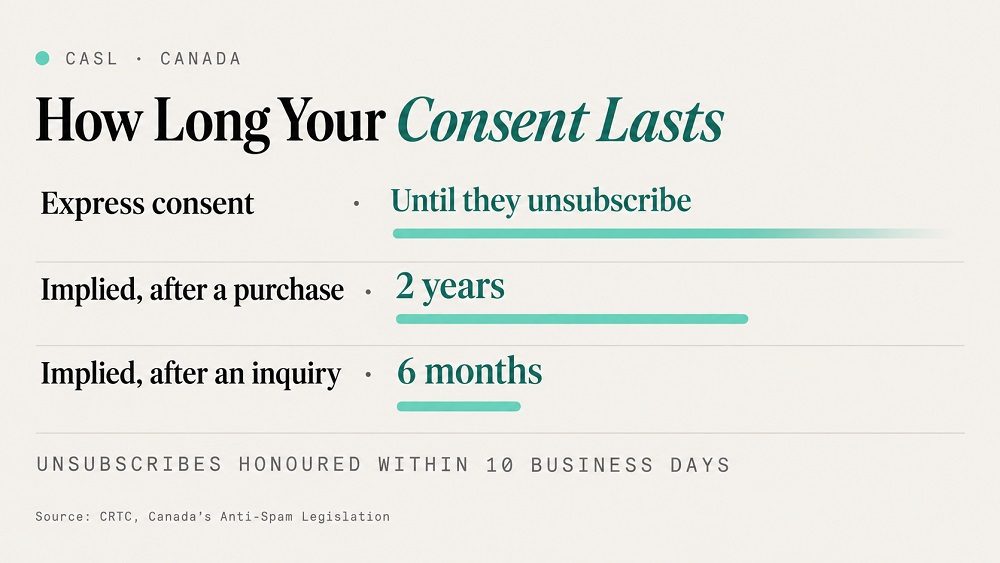
| Consent Type | How You Get It | How Long It Lasts |
|---|---|---|
| Express consent | The person actively opts in, for example by ticking an unchecked box or filling in a signup form | Until they unsubscribe |
| Implied consent (purchase) | The person bought from you or signed a contract with you | Two years from the most recent purchase |
| Implied consent (inquiry) | The person asked about your products or services | Six months from the inquiry |
What this means in practice:
- Never buy or rent lists. You cannot prove consent for contacts you did not collect.
- Use unchecked boxes. A pre-ticked box does not count as express consent.
- Convert implied consent while it lasts. Ask past customers and recent inquiries to opt in before their window closes.
- Identify yourself in every email. Include your business name, mailing address and another way to contact you.
- Honour unsubscribes within 10 business days. The link must be free, easy to use and keep working for at least 60 days after you send.
- Keep consent records. If a complaint comes in, the burden of proof is on you, so store the date, source and type of consent for every contact.
The CRTC publishes plain-language guidance and FAQs on Canada's anti-spam legislation. For anything unusual, such as contest entries or partner lists, check with a lawyer before you send.
Email Deliverability Checklist to Stay Out of Spam Folders
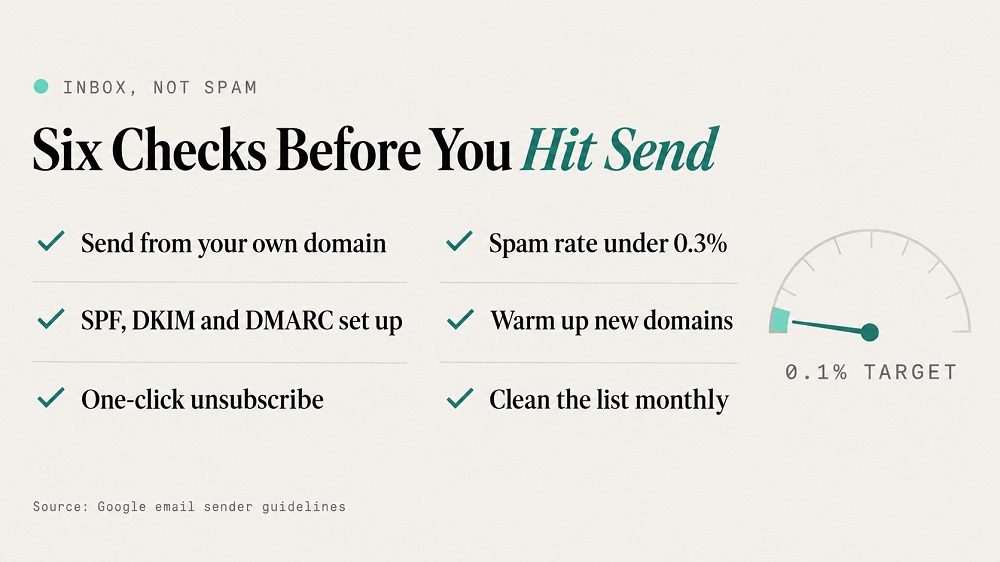
A compliant email still needs to reach the inbox. Gmail and Yahoo tightened their rules in 2024, and senders who ignore them see more mail filtered or rejected. Use this checklist:
- Send from your own domain. Use an address like [email protected], not a free Gmail or Outlook account.
- Set up SPF, DKIM and DMARC. These DNS records prove your emails really come from your business. Your email platform will show you which records to add.
- Add one-click unsubscribe. Bulk senders to Gmail must support it, and making it easy to leave keeps people from hitting "Report spam" instead.
- Watch your spam complaint rate. Google's email sender guidelines ask senders to stay below 0.3% and aim for under 0.1%.
- Warm up a new domain. Start with your most engaged contacts and raise volume gradually over a few weeks.
- Clean your list. Remove hard bounces right away and contacts who have not opened or clicked in a long time.
Small Business Email Marketing Metrics Worth Tracking
Your platform will show dozens of numbers. These five are enough for a monthly review:
| Metric | What It Tells You | What to Do When It Drops |
|---|---|---|
| Click rate | Whether the content and offer are relevant | Tighten the message to one offer and make the button clearer |
| Conversion rate | How many clicks became sales, bookings or calls | Check the landing page, not just the email |
| Revenue per email | The real value of each send | Shift effort toward the sequences that earn the most |
| Unsubscribe rate | Whether frequency and content match expectations | Send less often or segment more tightly |
| Bounce and spam rate | The health of your list and sender reputation | Clean the list and review your authentication setup |
Open rate is still useful for comparing subject lines, but privacy features in Apple Mail and other apps now inflate it, so do not judge a campaign on opens alone. If you already report on other channels, measure email the same way you would measure SEO ROI: by the leads and revenue it produces.
7 Email Marketing Mistakes Small Businesses Make
- Waiting for a big list. A list of 200 engaged customers can produce real revenue. Start now.
- Only sending promotions. Constant discounts train subscribers to ignore full-price emails.
- Sending inconsistently. Three emails one month and none for the next three makes people forget they subscribed, which leads to spam complaints.
- Skipping automation. One-off campaigns get attention, but automated sequences quietly produce most of the revenue.
- Ignoring mobile. If the button is hard to tap on a phone, most readers will not bother.
- Emailing without consent records. Under CASL, "they gave us their card once" is not enough if you cannot show when and how.
- Measuring opens instead of sales. Track what happens after the click.
When to Hire an Email Marketing Agency in Toronto
Doing email in-house works well while your list is small and you have time to write. It is worth bringing in help when:
- Leads come in faster than you can follow up with them.
- Your emails are landing in spam and you are not sure why.
- You have a list but no automated sequences running.
- You need consent tracking and reporting that will stand up under CASL.
At Mehrana, our email marketing program is built around the full path from first visit to booked call: custom lead magnets, dedicated landing pages, a six-month nurture sequence written for your customers, and sender setup tuned for inbox placement. Results report live in Patrick OS, so you can see opens, clicks, replies and conversions without waiting for a monthly PDF.
Ready to turn your contact list into a steady source of bookings and repeat sales?
FAQ
Frequently asked questions
How Can Email Marketing Help My Business?
Email keeps your business in front of people who already know you. It brings past customers back, follows up with leads you would otherwise lose and lets you announce offers to an audience you own, without depending on social media reach or ad spend.
How Often Should a Small Business Send Marketing Emails?
Automated sequences send based on each contact's actions. For campaigns and newsletters, a steady schedule you can keep up with, such as once every week or two, works better than bursts followed by silence.
Do I Need Consent to Email My Existing Customers in Canada?
Yes, but a purchase gives you implied consent for two years from the most recent transaction. An inquiry gives you six months. Use that window to ask customers to opt in, which turns it into express consent that lasts until they unsubscribe.
What Is the Best Email Marketing Platform for a Small Business?
It depends on how you sell. Online stores often do well with Klaviyo, service businesses with a sales process often prefer HubSpot, and simpler setups suit Mailchimp, MailerLite, Brevo or Constant Contact. Choose one that records consent and lets you send from your own domain.
How Do I Keep My Emails Out of the Spam Folder?
Send from your own domain, set up SPF, DKIM and DMARC, include a one-click unsubscribe link, keep spam complaints low and remove contacts who bounce or have stopped engaging.
Discussion