
How to Get More Google Reviews: 14 Policy-Safe Ways
Most local businesses do not have a review problem. They have an asking problem. Customers who had a good experience rarely go looking for your profile on their own, and the ones who do usually had a reason to complain. The businesses with hundreds of recent reviews are not luckier. They built a simple system that asks every customer, at the right moment, with a link that takes ten seconds to use.
This guide covers 14 ways to get more Google reviews that still work under Google's current review policy. That last part matters more in 2026 than it used to. Google tightened the wording of its Maps content policy this year, and several tactics that popular guides still recommend, like staff review leaderboards or asking customers to mention a specific service, now break the rules. Everything below is built on a fully optimized Google Business Profile, because reviews only help a profile that is already set up to rank and convert.
Why Google Reviews Decide Who Wins the Map Pack
Google says local results are based on three things: relevance, distance and prominence. Reviews feed directly into prominence. Google's own guidance states that review count and rating are part of how it judges a business, and that more reviews and positive ratings can improve local ranking. If you are stuck below competitors in the Google Map Pack, a thin or stale review profile is one of the first things to check. We break down the other common causes in why you're not ranking in the Google Map Pack.
Reviews also do three jobs beyond rankings:
- They convert searchers into calls. A profile with 140 reviews and a recent reply from the owner looks open, busy and trustworthy. A profile with 9 reviews from 2023 looks like a gamble.
- They feed AI answers. Google's AI features, ChatGPT and other assistants summarize what reviewers say about a business. Repeated themes in your reviews become the description an AI gives when someone asks for a recommendation. This is a core part of getting ChatGPT to recommend your business.
- They show you what to fix. Patterns in reviews, good and bad, are free customer research.
Recency counts as much as volume. Ten reviews from this month usually do more for trust than fifty from three years ago, which is why every tactic below is about building a steady flow rather than a one-time push. Steady review growth is also one of the signals our local SEO work tracks month to month.
Not sure how your review profile compares to the businesses ranking above you?
What Google's Review Policy Allows in 2026
Before any tactic, know where the line is. Google allows businesses to ask customers for reviews. What it does not allow is anything that influences whether a review gets written, what rating it gives, or what it says. Under Google's current Maps policy, a business may not:
- Offer anything in exchange for a review, including discounts, free products, gift cards, contest entries or loyalty points
- Ask only happy customers for reviews, or discourage unhappy ones from posting (this is called review gating)
- Pressure customers to leave a review while they are still on the premises
- Ask customers to include specific content in a review, including a staff member's name
- Require staff to collect a certain number of reviews
- Post reviews from owners, employees, family members or anyone with a conflict of interest
The last three points are the ones most businesses get wrong, because older guides still recommend them. Google says it blocked or removed more than 292 million policy-violating reviews in 2025, and violations can lead to removed reviews, a warning banner on your profile or limits on profile features. Every tactic in this guide stays on the right side of these rules.
Google Business Profile Setup: Make Reviewing Effortless
1. Verify and Complete Your Google Business Profile
Customers can only review a business that exists on Google Maps, and your replies, review link and QR code all live in a verified profile. Beyond verification, fill in every field: primary and secondary categories, service areas, hours, services, photos and a description that says what you do and where. A complete profile ranks better, which brings more visitors to it, which brings more potential reviewers. If your profile was set up years ago and never touched, a managed Google Business Profile keeps it current without adding to your workload.
2. Create a Short Google Review Link
Friction kills reviews. If a customer has to search for your business, find the reviews section and then find the write button, most will give up. Your review link opens the review form directly.
To get it, search your business name on Google while signed in to the account that manages the profile, open your Business Profile tools, and select Ask for reviews (shown as Get more reviews in some views). Google gives you a short link you can copy and share anywhere. Save it in one place your whole team can access, because every request in this guide uses it.
3. Generate a Review QR Code From Your Profile
The same Ask for reviews panel gives you a QR code that opens your review form. Print it on business cards, takeaway bags, packaging inserts, appointment cards, invoices and job completion sheets. A passive QR code at your counter is fine. What crosses the line is a staff member standing beside the customer while they write, or handing them a store tablet to review on. Both count as on-premises pressure, and many reviews posted from one shared device look like manipulation to Google's filters.
Review Requests: How to Ask So Customers Respond
4. Ask Every Customer, Not Just the Happy Ones
This is the single biggest change for businesses that use review software. Many tools were built around a filter: send a quick satisfaction survey, send the Google link only to people who answer 4 or 5 stars, and route everyone else to a private feedback form. That is review gating, and Google's policy prohibits selectively soliciting positive reviews.
The compliant version is simpler. Every customer who completes a purchase or service gets the same request with the same Google link. You can still offer a private feedback option alongside it, as long as the Google link is shown to everyone and nobody is steered away from it based on their answer. Check your review tool's settings, because some still ship with gating turned on by default.
Watch your wording too. "If you loved your visit, leave us a 5-star review" is gating in friendlier clothes. Ask for honest feedback, not a positive rating.
5. Time the Ask to Your Service Cycle
The best moment is when the experience is complete and still fresh. That moment is different for every business:
| Business Type | When the Experience Feels Complete | When to Send the Request |
|---|---|---|
| Restaurant, café, salon | When the customer leaves | Same day, 1 to 3 hours after the visit |
| Dentist, clinic, chiropractor | After the appointment | Same day or next morning |
| Plumber, HVAC, roofer, contractor | When the job is signed off | Within 24 hours of completion |
| Kitchen, renovation or design project | When the customer has used the result | 3 to 7 days after handover |
| E-commerce or shipped product | When the product has been used | 5 to 10 days after delivery |
| Law, immigration or accounting firm | At a milestone or file closing | Within a few days of the milestone |
Treat these as starting points. Run one timing for a month, then shift it and compare how many requests turn into reviews.
6. Send SMS and Email Review Requests With a Direct Link
A verbal ask is easy to forget once the customer walks out. A text or email puts the link in their hand at the moment they have time. SMS usually gets the fastest response because it is read within minutes, while email gives you room for a little more context. Using both, a text first and an email later for those who did not respond, tends to outperform either one alone. If you already send booking confirmations or invoices by email, the review request fits into the same email marketing flow.
Keep requests short, personal and neutral. Here are templates that follow Google's policy:
SMS template
Hi [First Name], thanks for choosing [Business Name] today. If you have a minute, we'd appreciate an honest review on Google: [review link]
Email template
Subject: How did we do, [First Name]?
Hi [First Name],
Thanks again for choosing [Business Name] for your [service]. We read every review, and honest feedback helps other people in [City] decide if we're the right fit for them.
It takes about a minute: [review link]
Thank you, [Your Name], [Business Name]
Notice what these templates leave out: no star rating, no request to mention a service or staff member, and no reward. Some older guides suggest nudging customers to name your service and city so the review carries keywords. Google's policy now treats requesting specific content as manipulation, so leave the content up to the customer.
7. Send One Reminder, Then Stop
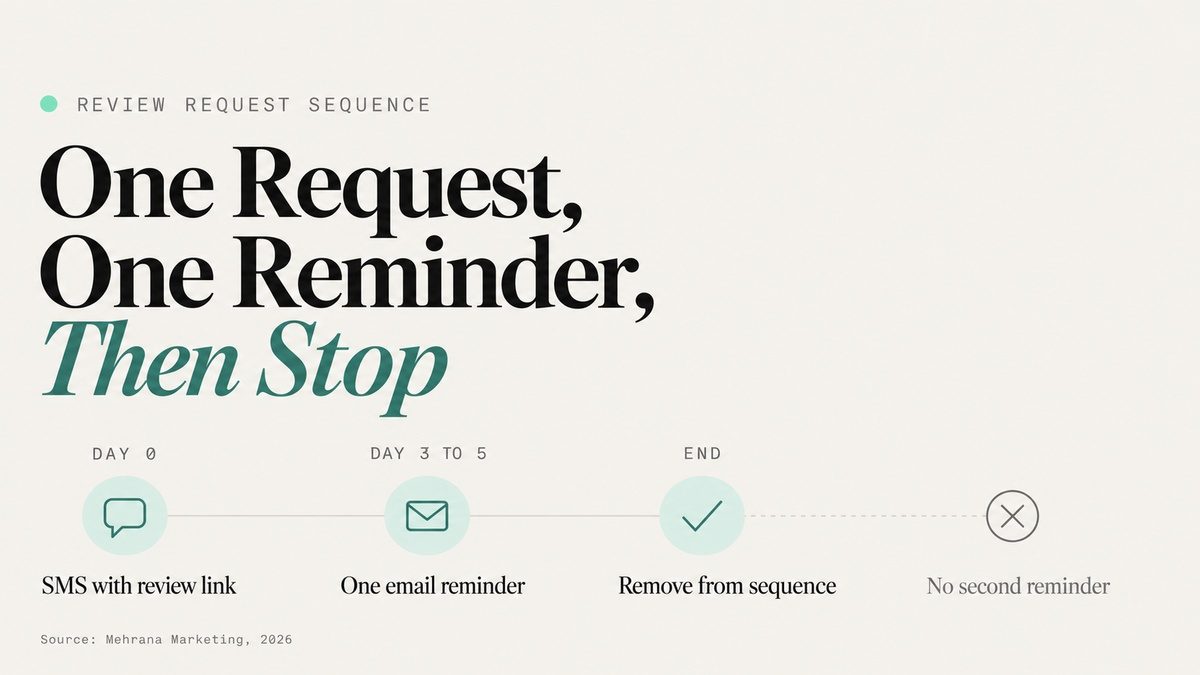
Many customers mean to leave a review and simply forget. One gentle reminder three to five days after the first request recovers a meaningful share of them. A second or third reminder starts to feel like pressure and can turn a satisfied customer into an irritated one. One request, one reminder, then remove them from the sequence.
8. Put the Review Link Where Customers Already Look
Every document a customer receives after paying is a chance to ask without asking. Add a one-line request and your short link or QR code to:
- Invoices and receipts
- Job completion or warranty documents
- Order confirmation and shipping emails
- Your team's email signatures ("How did we do? Share your experience on Google")
- Thank-you cards in packaging or project handover folders
None of these is a big lever on its own, but together they mean a customer sees the request several times without anyone sending an extra message.
9. Add a "Review Us on Google" Button to Your Website
Returning customers often visit your site to rebook, check hours or pay. Give them an obvious way to review you: a button in the footer, on your contact page and on any thank-you or booking confirmation page. Pair it with a section that displays your recent Google reviews, which builds trust with new visitors and reminds existing customers that you read them. If your site cannot easily take a reviews widget or a new button, that is usually a sign the website itself is due for an update.
Want review requests sent automatically after every job, without your team remembering to do it?
Review Automation: Keep Requests Running Without Extra Admin
10. Trigger Review Requests From Your CRM or Booking System
Manual asking works for a week, then gets forgotten during a busy stretch. Automation fixes that. Most booking tools, CRMs and field service platforms can send a message when an appointment is marked complete or an invoice is paid. Connect that trigger to your review SMS and email, add the single reminder, and every customer gets asked with no one on your team needing to remember.
For businesses running several tools that do not talk to each other, AI automation can connect your booking, invoicing and messaging so the review request fires from whichever system knows the job is finished. The same rules apply to automated requests: same link for everyone, no filtering by satisfaction score, no incentives.
11. Capture Phone Customers and After-Hours Leads Too
Customers who book by phone are the easiest to lose, because they often never enter your email or SMS flow. Make sure phone bookings create a contact record with a mobile number, so the review request reaches them after the visit like everyone else. Businesses using an AI receptionist already capture the caller's details and appointment on every call, including evenings and weekends, which closes the gap between who you serve and who you ask.
Review Momentum: Turn Existing Reviews Into New Ones
12. Reply to Every Google Review Within 48 Hours
Replies show potential reviewers that someone actually reads what they write, which makes them more likely to write something. They also show searchers how you handle problems.
For positive reviews, thank the customer by name and refer to something specific they said, so the reply does not look copied and pasted. For negative reviews, use a simple structure:
- Acknowledge the experience without arguing or making excuses
- Explain what you are doing to fix it, briefly and without customer details
- Move it offline with a direct phone number or email for the owner or manager
If you resolve the issue, you can ask the customer whether they would like to update their review. You cannot offer a refund, discount or anything else in exchange for changing or removing it, since that is explicitly prohibited.
13. Encourage Photo Reviews Without Scripting Them
Reviews with photos stand out on your profile and show real results: a finished kitchen, a plated dish, a repaired roof. You can mention in your request that photos are welcome ("Photos are always appreciated"), and you can make your space or finished work photogenic. What you should not do is tell customers what to photograph or write, or ask them to post while standing in your business.
14. Track Review Velocity Against Your Map Pack Competitors
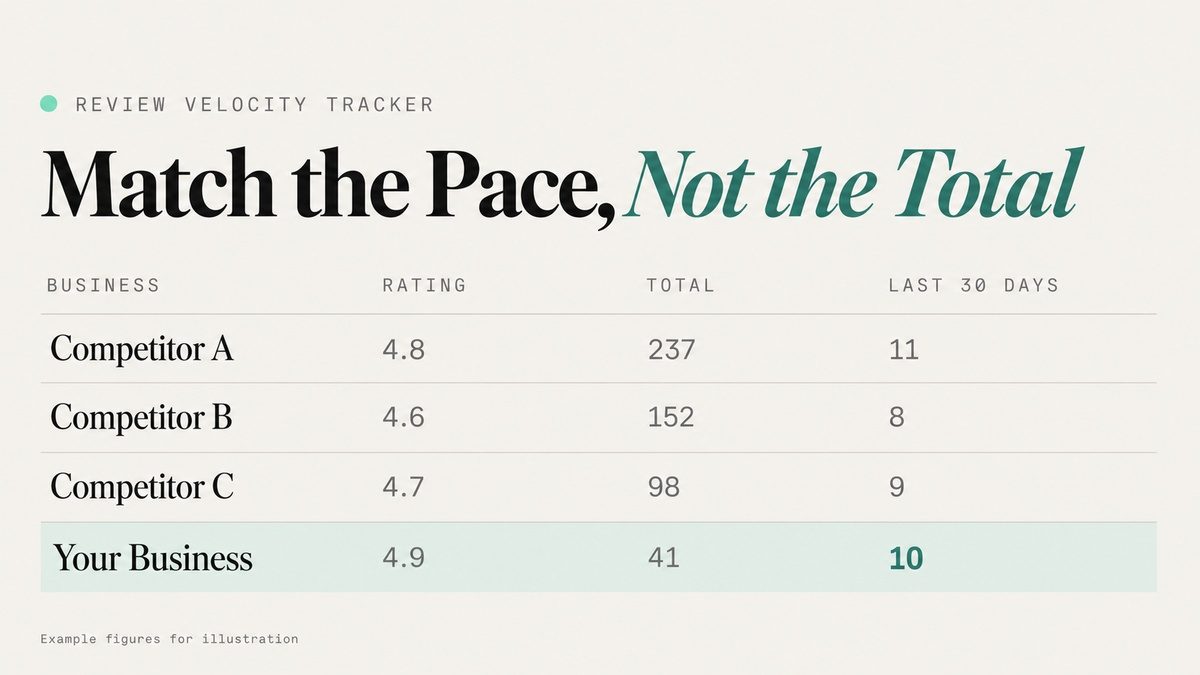
Total review count tells you where you are. Review velocity, the number of new reviews per month, tells you where you are heading. Once a quarter, search your main keywords from your business location and note the businesses in the Map Pack: their rating, total reviews, and how many reviews they received in the last 30 days (sort their reviews by newest to see this).
Your goal is to match or slightly beat the monthly pace of the top three, not to chase their total overnight. A sudden spike of dozens of reviews in a week can trigger Google's spam filters, while a steady rate looks natural and keeps your profile fresh. Track your own numbers monthly as well: requests sent, reviews received, average rating and reply rate. Reviews work alongside your other local signals, such as consistent local citations, so look at them as part of the full picture.
Review Tactics That Get Removed or Restricted
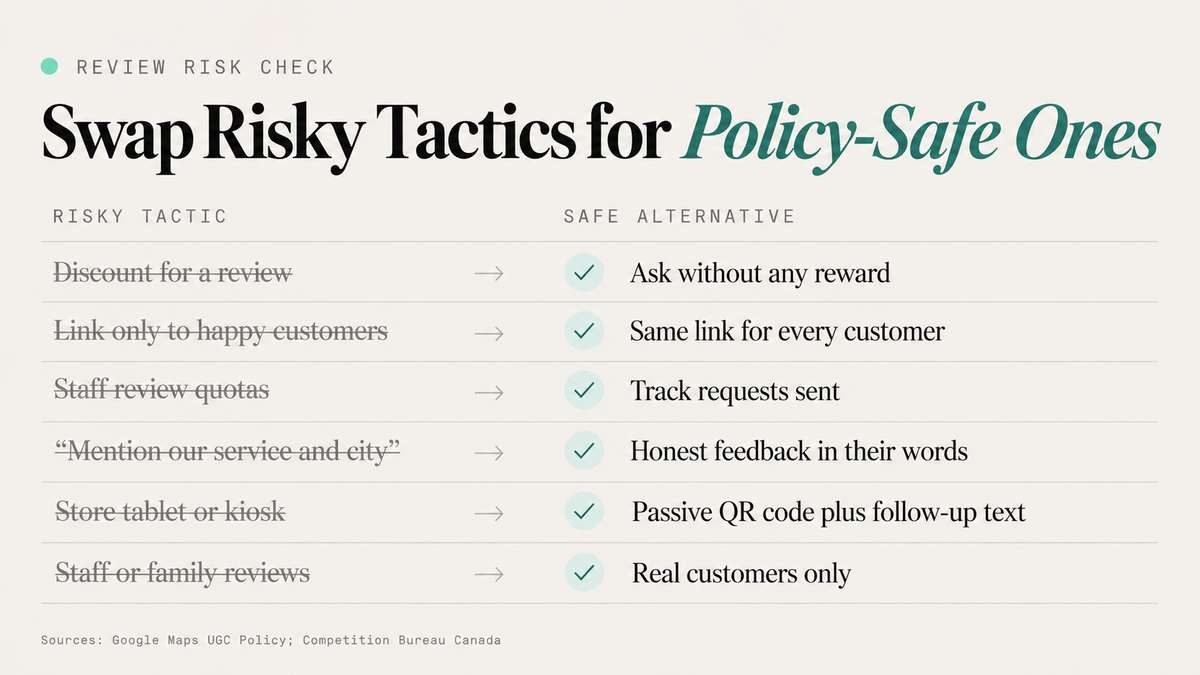
If you are reviewing an existing process, check it against this table. Every tactic on the left appears in older guides or review tools, and each one now carries real risk.
| Risky Tactic | Why It's a Problem | Policy-Safe Alternative |
|---|---|---|
| Discount or free item for a review | Incentivized reviews are prohibited and get removed | Ask without any reward |
| Sending the Google link only to happy customers | Review gating; selective solicitation is banned | Send the same link to every customer |
| Staff leaderboards or review quotas | Google prohibits requiring staff to collect a set number of reviews | Measure requests sent, not reviews earned |
| "Mention our service and city in your review" | Requesting specific content is not allowed | Ask for honest feedback in the customer's own words |
| "Please mention Sarah by name" | Requesting content that names staff is now explicitly prohibited | Let customers mention staff on their own |
| Store tablet or kiosk for reviews | On-premises pressure, and one device posting many reviews looks like manipulation | Passive QR code plus a follow-up text |
| Reviews from staff, family or friends | Conflict of interest under Google policy, and a legal risk in Canada | Only real customers review |
| Buying reviews or review packages | Fake engagement; can lead to profile restrictions and penalties | Build a steady request system |
Google's full rules are on its Maps prohibited and restricted content policy page, and they are worth reading once if you manage reviews for several locations.
For Canadian businesses, the risk is not only Google's. The Competition Bureau has warned that businesses can be liable for misleading reviews under the Competition Act, including honest reviews posted by employees who do not disclose their connection to the company. The Bureau has fined Canadian companies over fake and employee-posted reviews in the past, so a review shortcut can cost far more than the reviews are worth.
FAQ
Frequently asked questions
Is It Allowed to Ask Customers for Google Reviews?
Yes. Google allows businesses to ask for reviews as long as they do not offer incentives, ask only satisfied customers, pressure customers on the premises, request specific content or set staff review quotas.
Where Do I Find My Google Review Link?
Search your business on Google while signed in to the account that manages your profile, open the Business Profile tools and select Ask for reviews. Google provides a short link and a QR code you can share.
Can I Offer a Discount for a Google Review?
No. Any reward in exchange for a review, including discounts, free items, gift cards or contest entries, breaks Google's policy, and those reviews can be removed.
What Is Review Gating?
Review gating means screening customers by satisfaction first and sending only happy customers to Google. Google prohibits it. Every customer should receive the same request and the same review link.
How Many Google Reviews Do I Need to Rank in the Map Pack?
There is no fixed number. Compare yourself with the three businesses already in the Map Pack for your main keywords, then aim to match or beat their monthly review pace while improving your rating over time.
When Is the Best Time to Ask for a Review?
When the experience feels complete and is still fresh: same day for restaurants, salons and clinics, within 24 hours for service jobs, and a few days after handover or delivery for projects and products.
Should I Reply to Negative Google Reviews?
Yes. Acknowledge the experience, explain what you are doing to fix it and move the conversation offline. A calm, helpful reply often matters more to future customers than the review itself.
Build a Review System, Not a Review Campaign
The businesses that keep winning on Google do the same few things every week: they ask every customer, make the link easy, send one reminder, reply to everything and watch their pace against competitors. None of it is complicated. It just has to run consistently, and that is where most businesses fall behind.
Mehrana sets up compliant review systems for local businesses across the GTA, from Google Business Profile optimization to automated review requests and Map Pack tracking.
Discussion