
How to Rank Higher on Google Maps: 12 Steps for 2026
When someone opens Google Maps and types "dentist," "furnace repair" or "print shop," Google draws a short list of pins and ranks them in a fraction of a second. The businesses at the top get the calls, the direction requests and the walk-ins. Everyone else is one scroll away from being forgotten.
Ranking higher on Google Maps is not luck, and it is not about posting every day. It comes down to a handful of signals Google can read: what your business is, how close you are to the searcher, how much trust you have earned, and whether people engage with your listing once they see it. Below are the 12 steps we follow in our Map Pack ranking work for businesses across the GTA, in the order that tends to produce results fastest.
One note before you start. If your business does not appear on Google Maps at all, even when you search its exact name, you have an eligibility problem, not a ranking problem. Our guide on why you're not ranking in the Google Map Pack walks through suspensions, filters and duplicate listings. This guide is about climbing once your listing is live and eligible.
How Google Maps Ranking Works in 2026
Google says local results are decided by three things: relevance, distance and prominence. In plain terms:
- Relevance is how well your listing matches the search. Your categories, services, business details and website content all feed it.
- Distance is how far your business is from the person searching, or from the place named in the search.
- Prominence is how well known and trusted your business is, based on reviews, links, mentions across the web and real-world reputation.
There is a fourth signal practitioners now treat as just as real: whether your business is open at the moment someone searches. More on that in Step 5.
Google Maps SEO, sometimes called Google map listing SEO, is the work of strengthening those signals on your Google Business Profile and on the website it points to. Most of that work happens inside the profile itself, which is why Google Business Profile optimization is always the first phase. It overlaps heavily with local SEO, but the target is narrower: the pins, not the blue links.
The Google Maps Ranking Factors That Carry the Most Weight
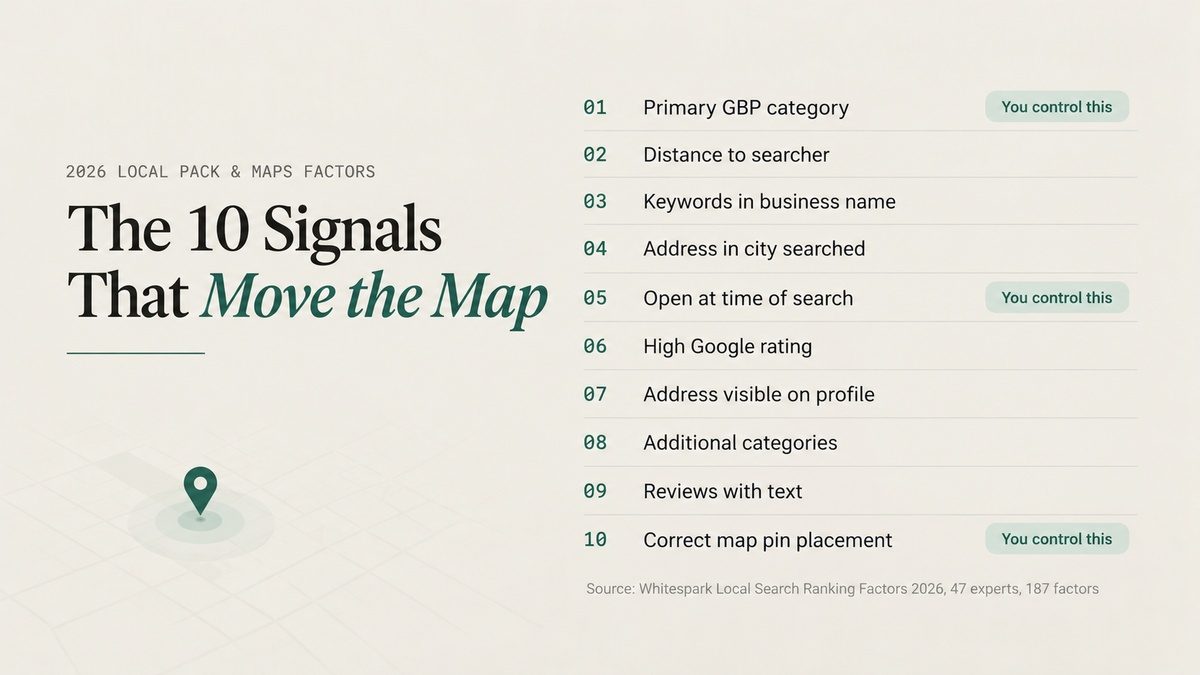
Google does not publish how much each signal counts. The closest thing to a public weighting is Whitespark's 2026 Local Search Ranking Factors report, where 47 local search specialists scored 187 individual factors. These are the ten they rated highest for local pack and Maps rankings:
| Rank | Factor | What It Means for You |
|---|---|---|
| 1 | Primary Google Business Profile category | The single field that decides which searches you compete in |
| 2 | Distance between searcher and business | Fixed by your real location; you work around it, not against it |
| 3 | Keywords in the business name | Only legitimate if the keyword is part of your real name |
| 4 | Physical address in the city being searched | Hard to change without moving |
| 5 | Business is open at the time of search | Your hours settings directly affect visibility |
| 6 | High Google rating (4 to 5 stars) | Service quality shows up as a ranking signal |
| 7 | Address visible on the profile | Storefronts have an edge over hidden-address listings |
| 8 | Additional categories | Real secondary services widen your reach |
| 9 | Number of Google reviews with text | Written reviews count more than bare stars |
| 10 | Correct map pin placement | A misplaced pin sends your rankings to the wrong spot |
Notice the pattern. At least five of the top ten are settings you can fix this week. Two depend on where your business physically sits. And number three is a trap that we cover in the mistakes section, because it works right up until a competitor reports you.
Google Maps App vs. the Map Pack in Search
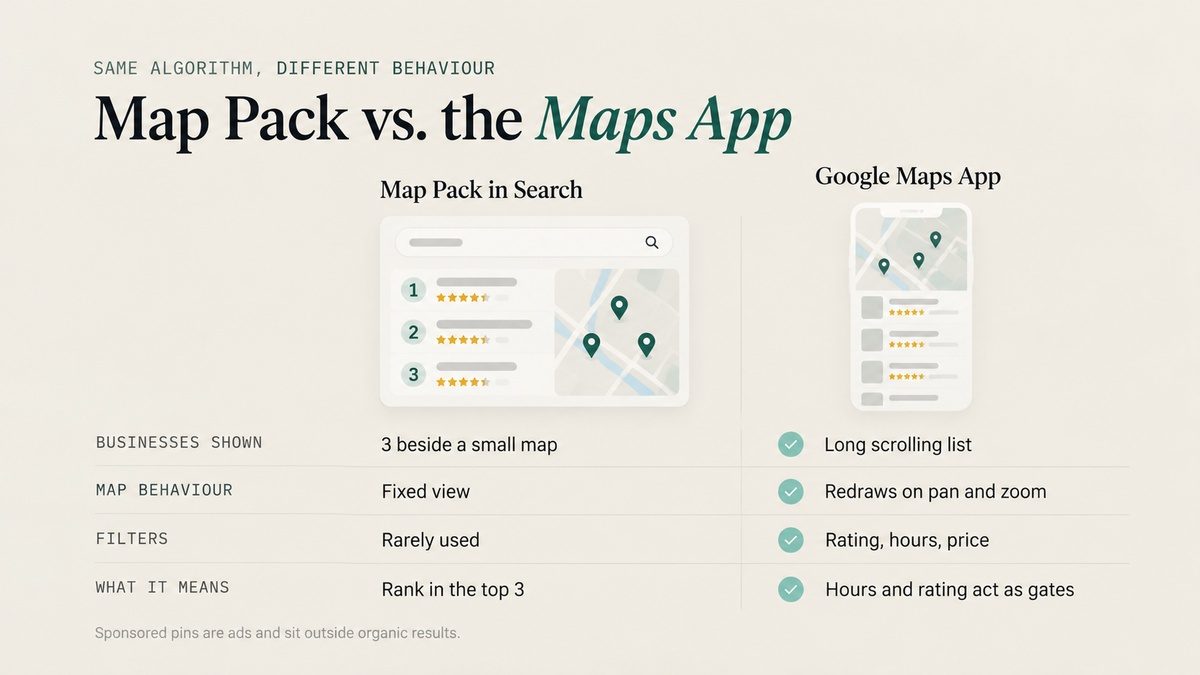
The same local algorithm feeds both, but people use them differently. The Map Pack in regular Google Search shows three businesses beside a small map. The Google Maps app shows a longer scrolling list, redraws results as the user pans and zooms, and lets people filter by rating, hours and price. Pins marked "Sponsored" are ads and sit outside the organic order.
That difference matters. In the app, a single tap on "Open now" or a rating filter can remove you from the list entirely. Hours and star rating are not just ranking inputs on Maps; they are gates.
12 Steps to Rank Higher on Google Maps
Work through these in order. Each step builds on the one before it, and the first five cost nothing but time.
1. Claim, Verify and Clean Up Your Google Map Listing
Search your exact business name while signed out of Google and open the result. Confirm it is your listing, that you own and manage it, and that it is verified and public. If it is unclaimed, claim it and complete verification before touching anything else.
Then clean up the basics:
- One profile per real location. Duplicate listings split your reviews and confuse Google. Merge or remove them.
- Your real-world name only. The name on your signage, invoices and website, with no added cities or services.
- The map pin in the right spot. Pin placement is a top-ten factor. Zoom in and drag it to your actual entrance if it sits on the wrong building or in the middle of a street.
This step is done when the correct profile shows for your name, you control it, and nothing about it contradicts reality.
2. Choose the Primary Category That Matches Your Most Valuable Search
Your primary category is the strongest relevance signal on the entire profile. Google uses it to decide which searches you are even eligible for.
Search your most valuable keyword from a location inside your service area and open the top three Maps results. Note their primary categories. If they all share a category you are not using, that is usually your answer. Pick the most specific category that accurately describes your main line of work, then add secondary categories only for services you genuinely provide. A Markham business that mostly does commercial printing for companies will compete better as a commercial printer than under a general print shop label, as long as that is truly its core business.
Record your current rankings before making the change. Category edits can trigger reverification, so change it once, for a good reason, and leave it alone.
3. Research the Google Maps Keywords Customers Actually Use
Google Maps keywords look different from the long queries people type into regular search. On Maps, the location is implied, so searches are short: "plumber," "emergency plumber," "plumber open now," "sushi." The intent is usually immediate.
Build your keyword list from four places:
- Maps autocomplete. Start typing your service on a phone from inside your area and note what Google suggests.
- Your profile's Performance report. It lists the actual search terms that triggered your listing.
- Competitors' categories and services. They reveal how Google groups your industry.
- Search Console data for the page your profile links to.
Group the keywords by service. Each group then needs a home: a category, a service entry, a heading on your landing page or service page, and, naturally, the reviews your customers write. What each group does not need is a slot in your business name or a pile of repetitions in your business description. Keywords in the description scored near the bottom of the factor list, and stuffing it is now rated a negative factor.
4. Add Predefined Services Before Custom Ones
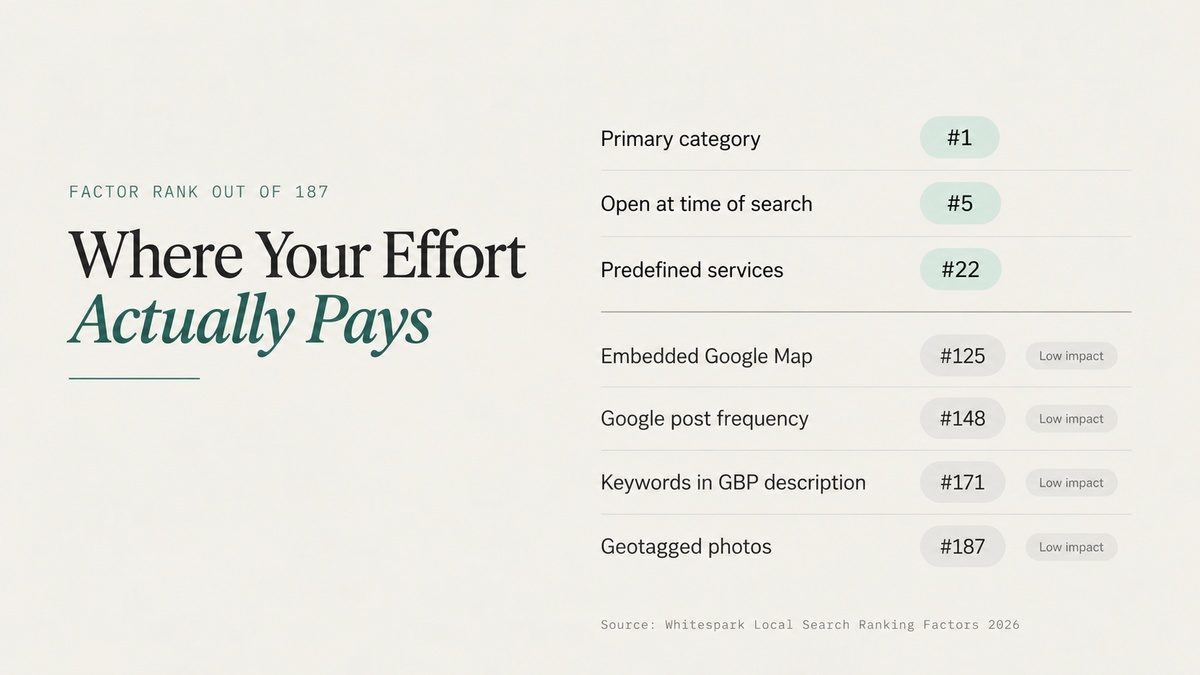
Inside your profile, Google offers a list of predefined services for your category. These used to be treated as a minor detail. In the 2026 survey, the presence of predefined services jumped to the 22nd most important Maps factor, after independent testing showed they influence rankings.
Add every predefined service that genuinely applies. Then add custom services for anything missing, using clear names that match how customers search (keywords in custom service titles also scored in the top 30). Retailers should add products. Finish with attributes, choosing only the ones that are true, such as wheelchair accessible entrance or online appointments.
5. Set Hours That Keep You Visible When People Search
Being open at the time of search is now rated the fifth strongest Maps factor. Businesses have been observed ranking first while open and slipping as closing time approaches, every day.
What to do:
- Keep regular hours accurate, and add special hours for every holiday so you do not show as closed on a day you are open.
- Use "more hours" for things like delivery, pickup or phone support when they differ from your main hours.
- If your phone is genuinely answered after hours, whether by staff on call or an AI receptionist, appointment-based businesses can reflect that honestly.
Do not stretch hours you do not keep. If customers can walk in, listing hours you are not open breaks Google's guidelines and invites angry reviews.
6. Link Your Profile to a Landing Page That Backs It Up
Your profile tells Google what you are. The page it links to has to prove it. Several top-20 factors live on that page: the name, address and phone number matching your profile exactly, your main keyword in the page title tag and headings, and content that mentions your city or neighbourhood in a natural way.
A single-location business can usually link to its homepage, as long as the homepage clearly states the core service and the area served. A multi-location business should link each profile to its own location page. Add LocalBusiness schema with the same details, make sure the page loads fast on mobile, and follow the basics in our on-page SEO guide for titles, headings and internal links.
7. Give Every Core Service Its Own Page
A single "Services" page cannot rank for eight different searches. Having a dedicated page for each service is a top-25 Maps factor and the number one factor for local organic results, which often appear right below the Map Pack.
Each service page should explain the work, show proof such as project photos, certifications or customer feedback, and make the next step obvious. Link each one back to your main landing page so authority flows to the URL your profile uses. Build neighbourhood or city pages only where you actually serve customers and have something specific to say. Ten near-identical city pages help no one.
8. Make Google Reviews a Weekly Habit, Not a Campaign
Four of the top 15 Maps factors are about reviews: a high average rating, the number of written reviews, how recent they are, and a steady flow over time instead of bursts. Review signals were also one of the fastest-growing factor groups in the 2026 survey.
Build one repeatable process:
- Ask every customer at the same natural moment, such as right after a completed job or a delivered order.
- Send a direct review link or show a QR code so leaving a review takes seconds.
- Ask them to describe their experience in their own words. Specific reviews tend to mention the service and the area on their own.
- Encourage photos when they fit. Reviews with photos scored in the top 50.
- Reply to reviews, especially critical ones. Replies carry little ranking weight on their own, but the next customer reads them before calling.
Never offer discounts or gifts for reviews, never filter unhappy customers away from Google, and never buy reviews. A sudden spike on a quiet profile is exactly what gets reviews filtered or the listing suspended.
9. Keep Your NAP Identical Everywhere With Local Citation Building
NAP stands for name, address and phone number. Google cross-checks yours against other maps platforms and directories, and consistency on Google Maps, Bing Maps and Apple Maps is a top-30 factor on its own. If Google sees your old suite number on one site and a tracking phone number on another, its confidence in your data drops.
Claim your listings on Apple Business Connect and Bing Places, then fix or build the directories that matter for your industry and for Canada, not just the generic US lists most tools default to. Our local citation building team handles this as a cleanup first and a build second. Citations have also become one of the strongest inputs for AI search: three of the top five AI visibility factors in the 2026 report were citation factors. Our article on local citations in local rankings covers which sources count.
10. Earn Local Links and Mentions From Real Relationships
Prominence is partly about who links to you and talks about you. Links from locally relevant websites to the page your profile uses rank in the top 30 Maps factors. Most local businesses have almost none, which makes this a real gap you can close.
Start with relationships you already have:
- Suppliers and manufacturers with dealer or installer pages
- Your BIA, chamber of commerce and trade associations
- Local teams, charities and events you sponsor
- Partners who refer work to you
- Local news and community sites that cover projects in your area
Ask one question about every opportunity: would this link still make sense if Google did not exist? That filter removes paid link packages and private blog networks, which put a single profile at risk. Our link building work is built on editorially placed Canadian links for that reason. If you are unsure how links and directory listings differ, read citations vs. backlinks.
11. Give Searchers Reasons to Engage With Your Listing
Behavioural signals grew in importance in the 2026 survey. Click-through rate from Maps results is now a top-15 factor, and engagement with your profile, such as browsing photos, reading reviews and requesting directions, also scored in the top 50.
You cannot fake engagement, but you can earn it:
- Upload real photos regularly. Photo quality matters. Include your exterior, so people recognize you on arrival, your team, your work and your space. Skip stock images and AI-generated visuals.
- Add short videos of your work or premises.
- Turn on booking, messaging or appointment links where they fit your business.
- Use posts for offers and updates. Post frequency scored low as a ranking factor, so treat posts as a conversion tool, not an algorithm trick.
One thing you can skip: geotagging photos. It ranked dead last out of 187 factors.
12. Prepare Your Profile for Ask Maps and AI Answers
On March 12, 2026, Google launched Ask Maps, a Gemini-powered feature that lets people ask Google Maps full questions, such as "who fixes furnaces on Sunday near me?" It rolled out first in the United States and India. Instead of a list, users get a conversational answer that draws on business profiles and reviews.
The businesses that show up in those answers are the ones whose profiles answer specific questions. That means complete services and attributes, reviews that describe real situations, plainly written business details and consistent listings across the web. Every step above feeds this. If you also want to show up when people ask ChatGPT or Perplexity for a local recommendation, that is the work of AI search optimization.
How to Track Your Google Maps Ranking the Right Way
Searching your own keyword from your office tells you almost nothing. Maps results change with every searcher's location, so your rank from your desk is one point out of hundreds.
A reliable tracking setup looks like this:
- Pick 5 to 10 keywords tied to services you want to sell.
- Run a geo-grid rank check, which samples your position from dozens of points across your area and shows the result as a heatmap.
- Note which competitors hold the top three spots across the grid.
- Check your profile's Performance report for calls, direction requests, website clicks and search terms.
- Add UTM tags to your profile's website link so visits show up separately in analytics.
- Re-run the same grid with the same keywords monthly.
Set realistic expectations. Category and profile fixes can show movement within days to a few weeks. Reviews, citations and local links compound over three to six months, and competitive categories in large cities take longer. Google's own tips to improve your local ranking confirm there is no paid shortcut: you cannot pay Google for a higher organic position on Maps.
Google Maps Optimisation Mistakes That Can Cost You Rankings
The 2026 Local Search Ranking Factors report added a list of negative and suspension-risk factors. These are the ones we see most often in profiles we audit:
- Stuffing keywords into the business name. It ranks third as a factor, which is why people do it. It also breaks Google's guidelines, any competitor can report it, and it is a common path to suspension.
- Stuffing the business description or posts with keywords. Both are now rated as negative factors.
- AI-generated text, photos or videos on the profile. Also flagged as a negative factor.
- Setting service areas larger than about two hours of driving. It does not extend your reach and raises suspension risk.
- Virtual offices or borrowed addresses used to look closer to more searchers.
- Changing categories or the business name every few weeks. Each edit can trigger reverification.
If your profile is already at risk or has been suspended, do not experiment with edits. That is where ongoing Google Business Profile management pays for itself.
FAQ
Frequently asked questions
What Is the Most Important Google Maps Ranking Factor?
In the 2026 Local Search Ranking Factors survey, the primary Google Business Profile category ranked first, followed closely by distance from the searcher. Category is the most important factor you can control directly.
How Long Does It Take to Rank Higher on Google Maps?
Profile fixes such as categories, services and hours can move rankings within days to a few weeks. Reviews, citations and local links build over three to six months, and competitive city categories can take longer.
Is Google Maps SEO Different From Local SEO?
Google Maps SEO focuses on the map results: your Google Business Profile and the signals that support it. Local SEO is broader and also covers the regular organic results for local searches. The two share most of the same work.
Can I Pay Google to Rank Higher on Google Maps?
No. Sponsored pins are ads and sit outside the organic results. Paying for ads does not change where your business ranks organically.
Do Google Posts Help Google Maps Ranking?
Post frequency scored low as a ranking factor. Posts are still useful for showing offers and updates to people who view your profile, so treat them as a conversion tool.
Can a Service-Area Business Rank on Google Maps?
Yes, but at a disadvantage, because a visible address is a top-ten factor. Service-area businesses make up the gap with the right category, complete services, steady reviews, consistent citations and local links.
Want to know which of these 12 steps would move your rankings fastest? Talk to our team and we will map your current visibility across your service area and show you where the gap is.
Continue reading
Read the latest issues

Discussion