
On-Page SEO Guide
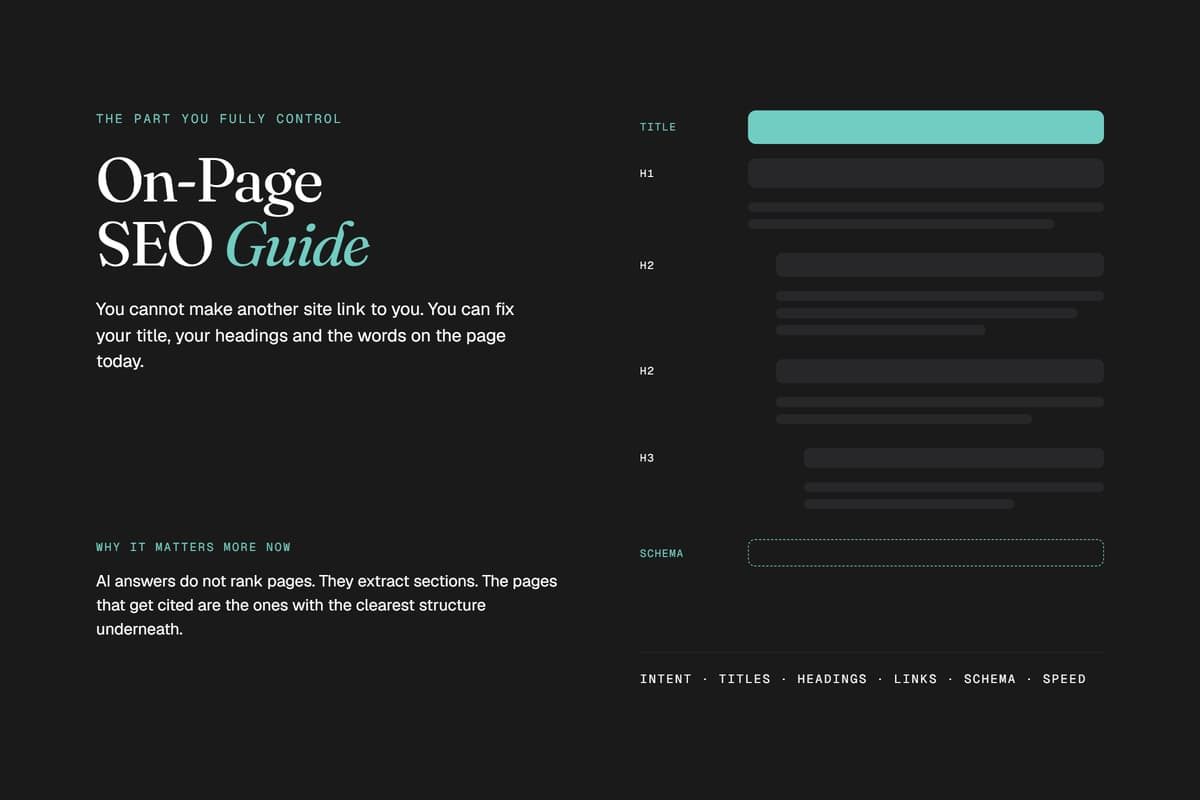
On-page SEO is every optimization you control directly on your own website: your titles, your headings, your content, your links, your code. Get it right and you give Google, and increasingly ChatGPT, Perplexity, Gemini, and Claude, a clear reason to show your page first. Get it wrong and even the best product or service in Toronto stays invisible.
This guide covers the full picture: the on-page fundamentals that have mattered for a decade, and the newer factors that decide whether AI engines cite you at all in 2026.
What Is On-Page SEO, and Why It Matters More Than Ever
On-page SEO is the practice of optimizing individual web pages, their content, structure, and HTML, so search engines and AI systems can understand what a page is about and match it to the right query. It sits alongside two other pillars: off-page SEO (backlinks, citations, brand mentions) and technical SEO (site speed, crawlability, indexing).
The difference is control. You cannot force another site to link to you, but you fully control your title tags, your headings, and the words on your page today. That makes on-page SEO the highest-leverage starting point for almost any SEO program, especially before you invest in link building or paid promotion.
The stakes changed in the past two years. Search results now include AI Overviews, and a growing share of queries never reach a traditional results page at all, they get answered inside ChatGPT or Gemini instead. The pages that get cited in those answers are, almost without exception, the ones with the clearest on-page structure.
Search Intent and Keyword Research Come First
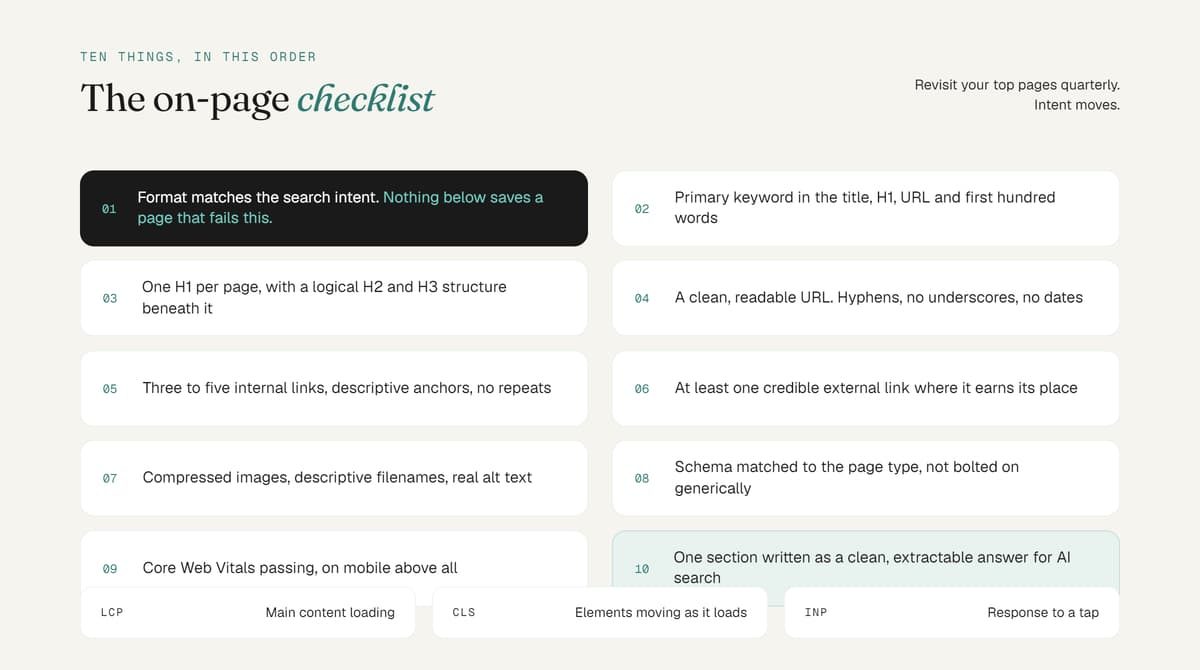
Before touching a single tag, know what the searcher actually wants. A search for "kitchen cabinet cost Toronto" wants a number, not a brand story. A search for "how to choose kitchen cabinets" wants an explainer. Match the format to the intent (comparison, list, how-to, transactional) or nothing else on this page will save you.
Once intent is confirmed, place your primary keyword deliberately:
- In the page title and H1
- Naturally within the first 100 words
- In at least one subheading
- In the URL
- Scattered naturally through the body, alongside related terms and synonyms, not repeated mechanically
Search engines now understand topics and entities, not just exact strings. Covering a topic thoroughly, including the related questions a reader would ask next, matters more than hitting a keyword density target.
Title Tags and Meta Descriptions
Title tags
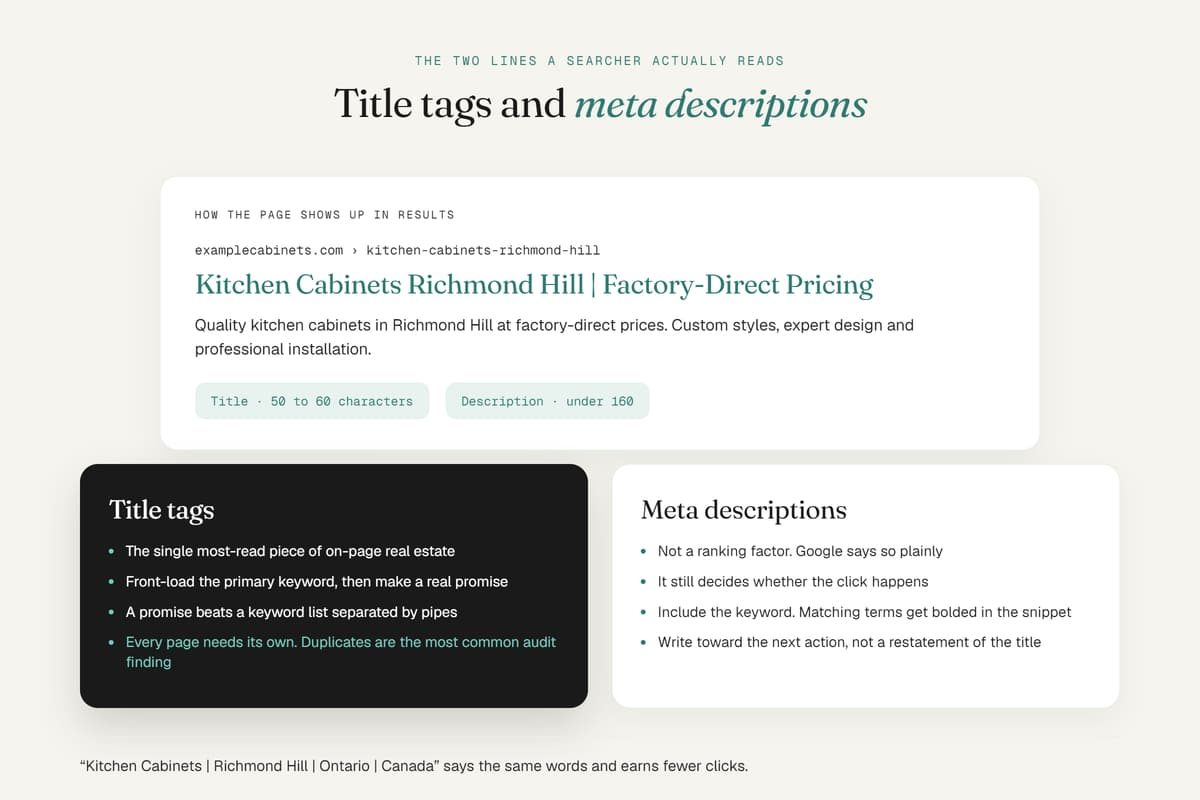
The title tag is still the single most-read piece of on-page real estate. Keep it to roughly 50 to 60 characters so Google doesn't truncate it, front-load your primary keyword, and make it a genuine promise rather than a keyword list. "Kitchen Cabinets Richmond Hill | Factory-Direct Pricing" earns more clicks than "Kitchen Cabinets | Richmond Hill | Ontario | Canada."
Every page needs a unique title. Duplicate or missing title tags are one of the most common on-page issues we find during a technical SEO audit.
Meta descriptions
Meta descriptions are not a ranking factor, Google confirms this directly, but they still drive click-through rate because they show up as the snippet under your title. Keep them under about 155 to 160 characters, include the primary keyword (Google bolds matching terms), and write toward the searcher's next action rather than restating the title.
URL Structure
Short, readable, keyword-inclusive URLs help both users and crawlers. /services/local-seo-toronto/ tells a reader exactly what they'll find before they click. /page?id=4471&cat=9 tells them nothing.
A few rules that hold up in 2026:
- Use hyphens between words, never underscores
- Drop function words (for, and, the) when they don't add clarity
- Avoid dates in the URL unless the content is genuinely time-locked
- Never change a live URL without a 301 redirect in place
Heading Hierarchy: H1 Through H6
Use exactly one H1 per page, and put your primary keyword in it. From there, H2s should mark your main sections and H3s should support them, the way this guide is structured. Headings do double duty: they help search engines map the page's topic, and they let a skimming reader (or an AI model summarizing your page) find the right section instantly.
Skipping levels or writing vague headings like "Overview" or "More Info" wastes that signal. "Kitchen Cabinet Installation Cost in Richmond Hill" tells a reader, and a crawler, exactly what's coming.
Content Depth, Quality, and E-E-A-T
Thin content doesn't rank in 2026, but neither does padding. Length itself isn't the goal. Google's own SEO Starter Guide is blunt about this: "there's no magical word count target, minimum or maximum". What actually moves rankings is whether the page fully answers the query, in your own words, backed by real experience.
That's the essence of E-E-A-T (Experience, Expertise, Authoritativeness, Trustworthiness). In practice, it means:
- Showing who wrote the page and why they're qualified
- Citing real data, not vague claims
- Keeping content current and correcting it when things change
- Writing from first-hand experience wherever possible, not just aggregating what already ranks
A page that says "we've helped 700+ Toronto businesses fix this exact issue" carries more weight, with readers and with algorithms, than the same claim made generically.
Internal and External Linking
Internal links
Internal links do three jobs: they help crawlers discover every page on your site, they pass authority from your strongest pages to the ones that need it, and they guide readers toward the next useful page. Ahrefs' on-page SEO guide makes a point worth stealing directly: point links from your highest-authority pages toward the pages you most want to rank, using a hub-and-spoke structure rather than linking everything randomly.
Use descriptive, natural anchor text (never "click here"), link to genuinely related pages, and never repeat the same internal link twice on one page.
External links
Linking out to credible, non-competing sources such as Google's own documentation or an established industry publication signals that your content is well-researched rather than written in a vacuum. It costs you nothing in rankings and builds real trust with readers who check your sources.
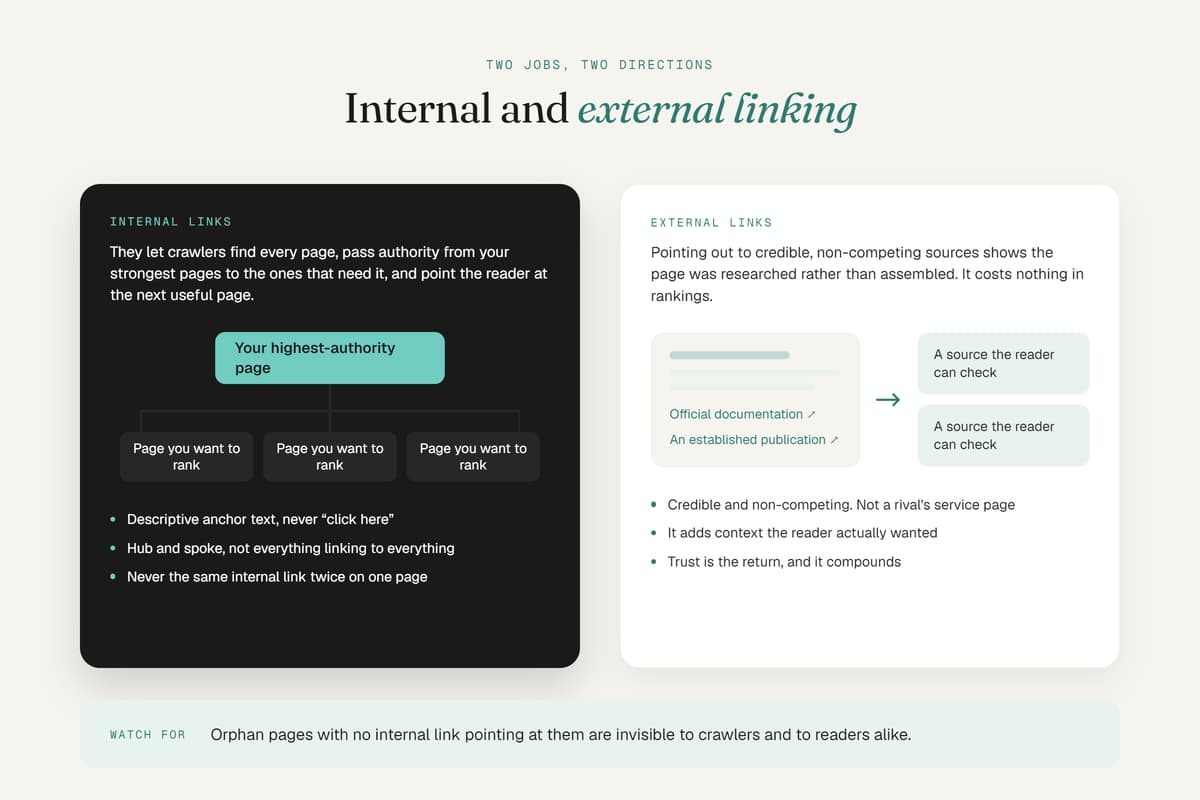
Image Optimization
Every image needs three things: a compressed file size (for load speed), a descriptive filename (richmond-hill-kitchen-cabinets.jpg, not IMG_4471.jpg), and specific alt text that describes what's actually in the image. Alt text also helps AI systems understand and potentially cite the visual content on your page, not just the copy.
Schema Markup and Structured Data
Schema is code that explicitly labels your content for machines: "this is a FAQ," "this is a review," "this is a local business with these hours." It doesn't guarantee a rich result, but it removes the guesswork for both Google and AI crawlers trying to parse your page.
Priority schema types for most sites:
- LocalBusiness on location and contact pages
- FAQPage on any page with a genuine Q&A section
- Article on blog content, for author and publish-date credit
- BreadcrumbList site-wide, for clean navigation signals
This is exactly the layer we build into every technical SEO engagement, since it's usually missing even on otherwise well-written sites.
Core Web Vitals and Page Speed
Page experience is an on-page factor with technical roots. Slow load times increase bounce rate directly, and Google has confirmed Core Web Vitals as a ranking input. The three metrics that matter:
- Largest Contentful Paint (LCP): how fast the main content loads
- Cumulative Layout Shift (CLS): whether elements jump around as the page loads
- Interaction to Next Paint (INP): how quickly the page responds to a click or tap
Most WordPress sites we audit sit at 2.8 to 4.5 seconds first paint. That gap alone is often the difference between page one and page three, which is why site speed work is one of the highest-ROI fixes available.
Structuring Content for AI Search and LLM Visibility
This is the biggest shift in on-page SEO since mobile-first indexing. AI Overviews, ChatGPT, Perplexity, and Gemini don't rank pages, they extract and summarize chunks of them. To be the chunk that gets pulled:
- Lead each section with the answer, then expand with supporting detail
- Write in clear, declarative sentences an AI model can lift cleanly without added context
- Use real subheadings that mirror actual questions people ask, not vague labels
- Add a genuine FAQ section, since Q&A format maps directly to how LLMs retrieve answers
- Keep sections self-contained, so each one reads like its own mini-answer
This is a different discipline from traditional keyword optimization, and it's the core of AI Search SEO: structuring content so it gets cited, not just ranked.
On-Page SEO for Toronto and GTA Businesses
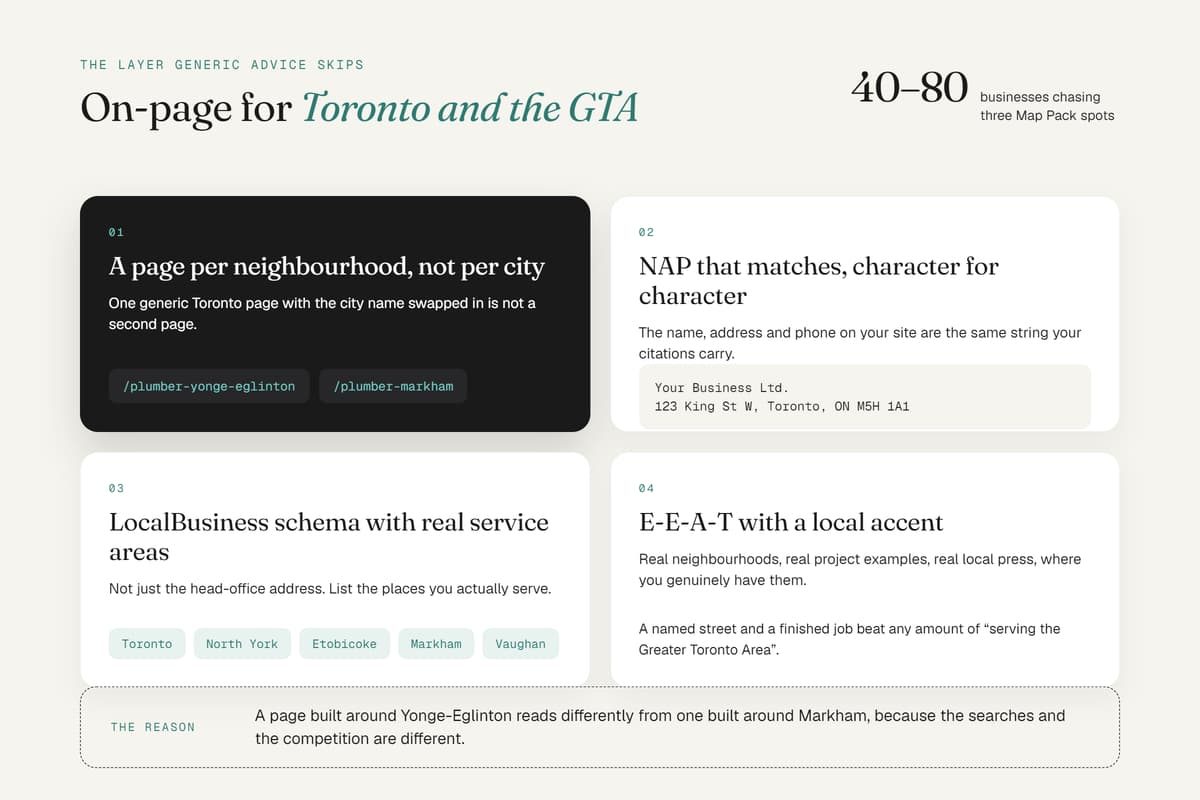
Generic on-page advice misses one layer that matters enormously for local businesses: geographic and entity signals. A downtown Toronto plumber competing against 40 to 80 businesses for three Map Pack spots needs on-page work that a national SaaS company never has to think about.
Practical additions for GTA sites:
- Neighbourhood-specific pages, not one generic "Toronto" page with the city name swapped in. A page built around Yonge-Eglinton reads differently than one for Markham, because the searches, and the competition, are different.
- NAP consistency (name, address, phone) matching exactly across your site and citations.
- LocalBusiness schema with accurate service areas, not just a head-office address.
- Locally-flavoured E-E-A-T, referencing real neighbourhoods, real project examples, real Toronto press mentions where you have them.
We saw this compound directly on one client: after a systematic on-page and content rebuild, SEP Immigration moved 153 keywords into the top 3 positions and grew organic traffic by over 3,000%, without a single new backlink in the first phase. On-page work alone closed most of that gap. Our Local SEO programs are built around this exact layer.
Common On-Page SEO Mistakes That Quietly Kill Rankings
- Keyword stuffing. Repeating a phrase unnaturally reads badly and can trigger a spam signal. Say it once clearly, then use synonyms.
- Duplicate title tags and meta descriptions across dozens of pages, extremely common on template-built sites.
- Orphan pages with no internal links pointing to them, invisible to both crawlers and readers.
- Missing or generic alt text, or worse, alt text stuffed with keywords instead of a real description.
- Ignoring mobile. Google indexes the mobile version of your page. If it's broken there, it doesn't matter how good the desktop version looks.
- Treating on-page SEO as a one-time task. Search intent shifts, competitors publish, algorithms update. Revisit your top pages at least quarterly.
On-Page SEO Checklist for Toronto Businesses
- Primary keyword in the title tag, H1, URL, and first 100 words
- Title tag under ~60 characters, meta description under ~160
- One H1 per page, logical H2/H3 structure beneath it
- 3 to 5+ relevant internal links, natural anchor text, no repeats
- At least one credible external link where it adds real value
- Compressed images with descriptive filenames and alt text
- Schema markup matched to page type (LocalBusiness, FAQPage, Article)
- Core Web Vitals passing, especially on mobile
- At least one section written in clear, extractable, declarative language for AI search
- For local pages: neighbourhood-specific content, consistent NAP, accurate service-area schema
FAQ
What is the difference between on-page and off-page SEO? On-page SEO covers everything you control directly on your website, content, tags, structure, code. Off-page SEO covers external signals like backlinks, citations, and brand mentions. Both matter, but on-page is where every SEO strategy should start, since it's entirely within your control.
How many words does a page need for good on-page SEO? There's no fixed target. A page needs enough words to fully answer the search intent behind it and no more. A local service page might need 600 words; a comprehensive guide might need 3,000. Depth beats padding every time.
What's the single most important on-page SEO factor in 2026? Content that genuinely satisfies search intent, paired with a heading structure clear enough for both humans and AI models to extract the answer. Titles and schema support that goal, but they can't substitute for it.
Does on-page SEO still matter now that AI search exists? More than ever. AI Overviews, ChatGPT, and Perplexity pull directly from well-structured pages. Clear headings, declarative answers, and genuine FAQ sections are now on-page requirements, not nice-to-haves.
How long until on-page SEO changes show results? Google typically reflects changes within a few weeks, though competitive terms can take 3 to 6 months to move meaningfully. Local, less competitive pages often move faster, sometimes within 14 to 35 days of a proper fix.
Do I need a developer to fix on-page SEO? Some fixes (titles, headings, alt text, content) don't require code. Others (schema markup, Core Web Vitals, canonical tags) usually do. A proper SEO audit will tell you which bucket each fix falls into before you spend on either.
Discussion