
SEO Call Tracking: How to Track Organic Calls Safely
Your SEO report shows rankings, clicks and form fills. It usually does not show the phone call from someone who found your service page on Google and tapped your number. For plumbers, clinics, law firms and contractors, that call is often the lead that matters most, and it is invisible in Google Analytics and Search Console by default.
SEO call tracking fills that gap. The worry most business owners have is that a tracking number will damage their local SEO by breaking NAP consistency. That risk is real, but it is narrow: it comes from where a tracking number is placed, not from call tracking itself. Set up correctly, call tracking and SEO work together, and the call data becomes one of the strongest inputs for measuring SEO ROI.
What SEO Call Tracking Measures That GA4 Misses
Call tracking connects a phone call to the marketing source behind it. A script on your website shows a tracking number to visitors who arrive from Google, the call forwards to your normal line, and the platform ties it to the visitor's session. That gives you data standard analytics does not record:
- Which landing page the caller was on before they dialled
- Whether the visit came from organic search, Google Business Profile, paid ads or a referral
- Call duration, whether the call was answered, and a recording or transcript
- Which calls became booked jobs once you tag the outcome
GA4 can count clicks on a phone link, but a click is not a conversation. It cannot tell you if the call connected or whether the caller was a real customer.
Is Call Tracking Bad for SEO? Where the Local Ranking Risk Sits
Local SEO depends on your business name, address and phone number (NAP) matching across your website, your Google Business Profile and the directories that list you. That is why consistent local citations are part of every Map Pack strategy.
Call tracking only causes trouble when a tracking number replaces your real number in a place Google uses for that cross-check. The four placements to watch are:
| Placement | Risk | Correct Setup |
|---|---|---|
| Directories and citation sites | High | Real number only, every listing |
| Hard-coded in website HTML | High | Real number in source code, tracking number swapped in by script |
| LocalBusiness schema markup | Medium | Real number in the telephone property |
| Google Business Profile | Low when set up correctly | Real number visible to Google (see the two setups below) |
Static tracking numbers in paid ads, print and radio carry no SEO risk, because those placements are not business listings search engines read.
How Dynamic Number Insertion Keeps Your Website Crawl-Safe
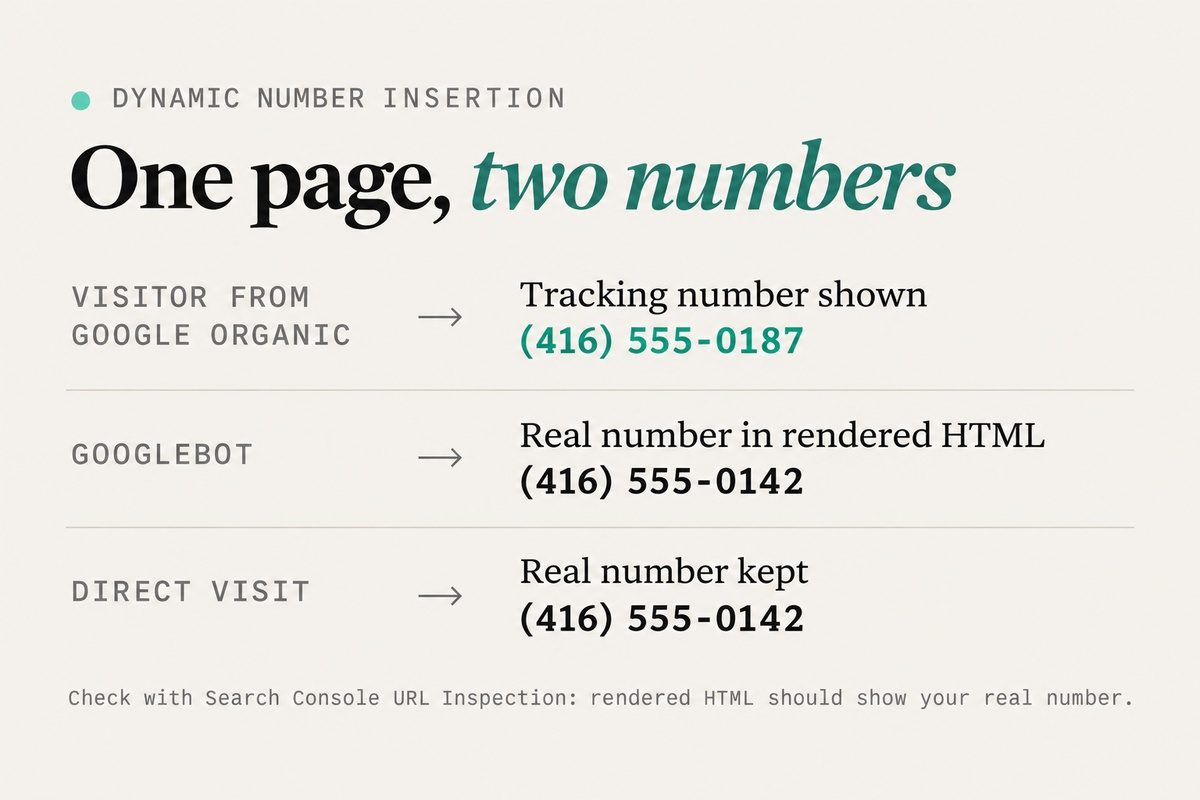
Dynamic number insertion (DNI) is the method that makes website call tracking safe. Your real number stays in the page's HTML, and a JavaScript snippet swaps it for a tracking number only for visitors who match a source rule, such as "arrived from Google organic."
A common claim is that DNI is safe because Google does not run JavaScript. That is outdated. Google's own JavaScript SEO documentation says Googlebot renders pages in a headless Chromium browser and uses the rendered HTML for indexing. The real protection is the source rule: Googlebot is a crawler, not a person clicking through from search results, so a script set to swap only for search visitors should leave the default number in place. The check below confirms it.
Two settings make or break this:
- Keep "direct" or no-referrer visits on your real number. If your DNI pool swaps the number for every visitor, Google can see the tracking number.
- Check the result in Google Search Console. Run URL Inspection on a key page, view the rendered HTML from the live test, and confirm your real number appears. A technical SEO audit should include this check after any tracking script change.
Session-Level vs Source-Level Tracking Numbers
Source-level tracking uses one number per channel, such as organic or Google Business Profile, and tells you which channel produced the call. Session-level tracking rotates a pool of numbers so each visitor gets a unique one, tying the call to the exact landing page. To see which service pages produce calls, you need session-level tracking for organic traffic.
Google Business Profile Call Tracking: Two Setups Compared
Your Google Business Profile is often the biggest source of local calls, and many of those callers never visit your website. There are two reasonable ways to handle it.
Setup 1: Keep Your Real Number as the Primary Phone
Your profile shows your real number, and you rely on Google's own reporting. Business Profile performance counts calls as the number of times someone clicked the call button. Since June 2026, Google Analytics can also pull that call metric in through a native Business Profile link, alongside website clicks, directions and bookings.
This setup carries zero NAP risk, but the data is limited. A button tap does not confirm the call connected or was a real lead, and when several profiles are linked to one Analytics property, the metrics are combined rather than split by location.
Setup 2: Tracking Number as Primary, Real Number as Additional
You enter a local tracking number as the primary phone and move your real number into the additional phone field. Google allows up to two additional numbers on a profile. Local SEO specialists such as Sterling Sky recommend this setup because Google can still match your real number to your website and citations, while every profile call is recorded and attributed.
If you use this setup, choose a tracking number with your local area code, make sure it forwards to a line your business controls, and add UTM parameters to your profile's website link so GBP visits are separated from regular organic traffic. After Google reviews the edit, check that both numbers still display in the profile editor.
| Setup 1: Real Number Primary | Setup 2: Tracking Number Primary | |
|---|---|---|
| Primary phone | Real number | Tracking number |
| Additional phone | None needed | Real number |
| NAP risk | None | Low, real number stays on the profile |
| What you measure | Call button taps | Every call, recorded and attributed |
| Data per location in GA4 | Combined across linked profiles | Separate per tracking number |
Not sure which of your calls come from organic search and which come from your profile? We can audit your tracking setup and your NAP data together.
Call Tracking Rules for Citations, Schema and Multi-Location Listings
Outside your website and profile, the rule is simple: the real number goes everywhere Google reads business data.
- Citations: every directory, data aggregator and industry listing gets the real number. If a tracking number has already leaked into directories, update those listings before adding more.
- Schema markup: the telephone property in your LocalBusiness schema should match the real number, not a tracking number.
- Multiple locations: each location keeps its own real local number across its profile, citations and location page. DNI can still run on each location page as long as the source HTML shows that location's real number.
Turning Organic Call Data Into Better SEO Decisions
- Prioritize pages that produce calls. A service page with modest traffic but steady calls deserves more internal links than a busy blog post with no calls.
- Write from real questions. Recordings show the questions customers ask before booking. Those belong in your service page copy and FAQs.
- Separate qualified calls from noise. Tag calls by outcome so spam, existing customers and sales pitches do not inflate your organic results.
- Fix missed calls. If tracking shows organic callers reaching voicemail after hours, that is lost revenue SEO already paid for. An AI receptionist can answer those calls.
Mehrana clients see this in Patrick OS, where call attribution sits next to rankings and Google Business Profile activity, so a ranking gain can be checked against the calls it produced.
SEO Call Tracking Setup Checklist
- Choose a call tracking platform that supports DNI, session-level pools, recordings and a GA4 integration.
- Install the tracking script and set it to swap numbers only for defined sources, with direct visits keeping your real number.
- Create a session-level pool for organic search and a separate number or pool for paid ads.
- Decide on your Google Business Profile setup: real number only, or tracking number as primary with the real number as additional. Review Google's Business Profile guidelines on phone numbers before you edit.
- Add UTM parameters to the website link on your profile.
- Confirm your real number appears in the page source, in your LocalBusiness schema and in every citation.
- Run URL Inspection in Search Console and check the rendered HTML shows your real number.
- Link your profile to Google Analytics through the Business Profile link so profile call clicks sit beside your website data.
- Tag call outcomes each week and report qualified organic calls, not total calls.
FAQ
Frequently asked questions
Does Call Tracking Hurt Local SEO Rankings?
Not when tracking numbers stay out of your citations, source code and schema. DNI keeps your real number in the HTML search engines read.
Can I Use a Call Tracking Number on My Google Business Profile?
Yes, if you add it as the primary phone and keep your real number in the additional phone field. The tracking number should be local, under your business's direct control and forwarded to your own line.
Can Google See the Number That DNI Shows?
Google renders JavaScript, so it could see a swapped number if your script changes the number for every visitor. Set the swap to trigger only for specific traffic sources and confirm the rendered HTML in Search Console shows your real number.
Is the Calls Metric in GA4 the Same as SEO Call Tracking?
No. The Business Profile calls metric counts clicks on the call button in your profile. Call tracking records the actual calls from your website and profile, with duration, recording and the page or source behind each one.
Want to know how many calls your organic rankings bring in each month, and which pages earn them? We will set up SEO call tracking without touching your NAP consistency.



Discussion